U
UGerstl
Guest
Hi killuminati777,
another day another problem...
Edit: Important: I can reproduce this problem, please wait for further analysis...
09/16/2011 14:19 Germany
Edit: 09/16/2011 14:27 Germany
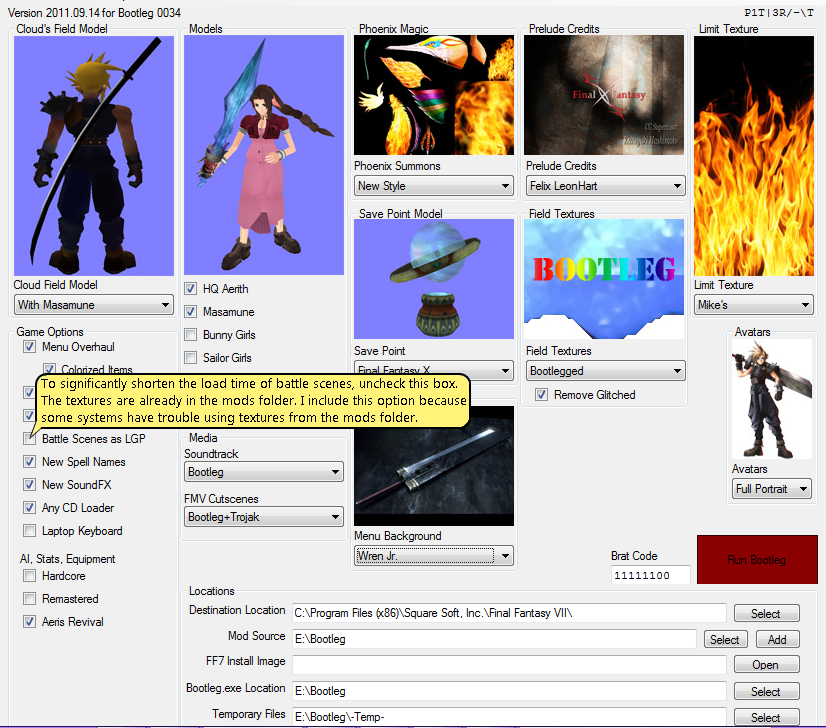
Error found: Don`t use spaces in the path structure of following folders:
Locations: Mod Source
Bootleg.exe Location
Q: Does it matter where the folder with all the mods and bootleg files is located at?
A: Please don't copy all the files to your Desktop, like you have done.
Create a separate folder on one of your partitions (e.g. D:\Bootleg) and
move all your files into it.
Q: Am i supposed to install the codecs that come with the ff7 install?
A: These codecs are obsolete.
"Aali's Custom graphics driver for FF7/FF8" is used instead.
Don't worry if you installed them.
Q: Am i doing something wrong with the normal ff7 installation?
A: No, as long as you selected the "Maximum" installation.
Q: Let's pretend something is wrong with my ff7 installation, shouldn't it start
anyways after i hit the "run bootleg" button?
A: Yes. (but PitBrat should it know better than me)
Q: So, no one else had this problem before? Weird stuff. Damn Vaio Laptop.
A: Every system is unique, so the problems are.
We are using Netbook's / Notebook's / Desktop-PC's with different hardware
from different producers.
And every user has an unique windows configuration.
Q: What would happen if i try to run the bootleg.exe manually not by running the BFE??
A: It is strongly recommended to use the "BFE.exe".But to bypass your problem it is
an option. You have to add a lot of parameters (=> Bootleg_Readme.txt).
Q: On page 3 i saw someone posted a pic of how the folder with all the mods should look
like, and i noticed that the endings (.rar / .zip etc) of every file look different for me.
As you can see my files dont have the endings, could that be the problem or part of my
problem???
A: No, absolutely no. Open your windows explorer (Windows-Key + E), look at the main bar:
Extras => Folder options => Display: Show known file extensions
(I hope i translated it right, because i have a german Windows version)

For more informations wait until PitBrat is alive again...
another day another problem...
Edit: Important: I can reproduce this problem, please wait for further analysis...
09/16/2011 14:19 Germany
Edit: 09/16/2011 14:27 Germany
Error found: Don`t use spaces in the path structure of following folders:
Locations: Mod Source
Bootleg.exe Location
Q: Does it matter where the folder with all the mods and bootleg files is located at?
A: Please don't copy all the files to your Desktop, like you have done.
Create a separate folder on one of your partitions (e.g. D:\Bootleg) and
move all your files into it.
Q: Am i supposed to install the codecs that come with the ff7 install?
A: These codecs are obsolete.
"Aali's Custom graphics driver for FF7/FF8" is used instead.
Don't worry if you installed them.
Q: Am i doing something wrong with the normal ff7 installation?
A: No, as long as you selected the "Maximum" installation.
Q: Let's pretend something is wrong with my ff7 installation, shouldn't it start
anyways after i hit the "run bootleg" button?
A: Yes. (but PitBrat should it know better than me)
Q: So, no one else had this problem before? Weird stuff. Damn Vaio Laptop.
A: Every system is unique, so the problems are.
We are using Netbook's / Notebook's / Desktop-PC's with different hardware
from different producers.
And every user has an unique windows configuration.
Q: What would happen if i try to run the bootleg.exe manually not by running the BFE??
A: It is strongly recommended to use the "BFE.exe".
an option. You have to add a lot of parameters (=> Bootleg_Readme.txt).
Q: On page 3 i saw someone posted a pic of how the folder with all the mods should look
like, and i noticed that the endings (.rar / .zip etc) of every file look different for me.
As you can see my files dont have the endings, could that be the problem or part of my
problem???
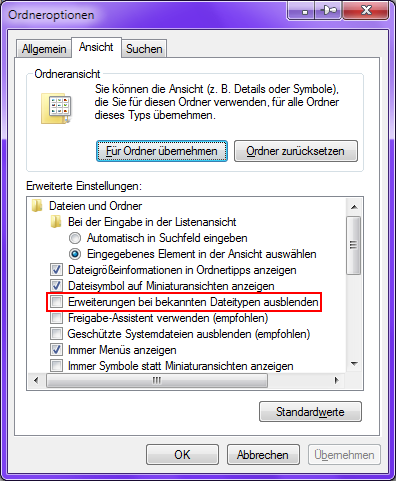
A: No, absolutely no. Open your windows explorer (Windows-Key + E), look at the main bar:
Extras => Folder options => Display: Show known file extensions
(I hope i translated it right, because i have a german Windows version)
For more informations wait until PitBrat is alive again...
Last edited: