[FF7] Original and Outdated Tutorial - Bootleg Configurator

  • Thread starter Thread starter PitBrat
  • Start date Start date
Status
Not open for further replies.
Hi killuminati777,

another day another problem...


Edit: Important: I can reproduce this problem, please wait for further analysis...
        09/16/2011 14:19 Germany

Edit: 09/16/2011 14:27 Germany
        Error found: Don`t use spaces in the path structure of following folders:
                                Locations: Mod Source
                                                 Bootleg.exe Location


Q: Does it matter where the folder with all the mods and bootleg files is located at?

A: Please don't copy all the files to your Desktop, like you have done.
    Create a separate folder on one of your partitions (e.g. D:\Bootleg) and
    move all your files into it.


Q: Am i supposed to install the codecs that come with the ff7 install?

A: These codecs are obsolete.
    "Aali's Custom graphics driver for FF7/FF8" is used instead.
    Don't worry if you installed them.


Q: Am i doing something wrong with the normal ff7 installation?

A: No, as long as you selected the "Maximum" installation.


Q: Let's pretend something is wrong with my ff7 installation, shouldn't it start
     anyways after i hit the "run bootleg" button?

A: Yes. (but PitBrat should it know better than me)


Q: So, no one else had this problem before? Weird stuff. Damn Vaio Laptop.

A: Every system is unique, so the problems are.
    We are using Netbook's / Notebook's / Desktop-PC's with different hardware
    from different producers.
    And every user has an unique windows configuration.


Q: What would happen if i try to run the bootleg.exe manually not by running the BFE??

A: It is strongly recommended to use the "BFE.exe". But to bypass your problem it is
    an option. You have to add a lot of parameters (=> Bootleg_Readme.txt).


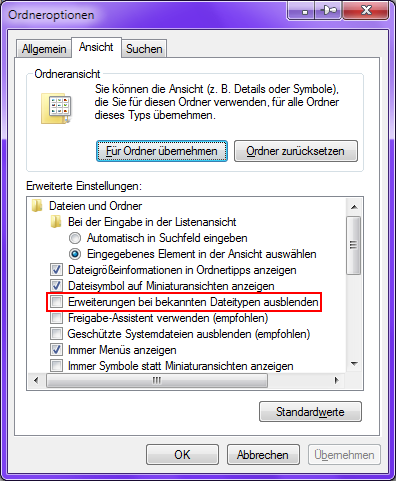
Q: On page 3 i saw someone posted a pic of how the folder with all the mods should look
     like, and i noticed that the endings (.rar / .zip etc) of every file look different for me.
     As you can see my files dont have the endings, could that be the problem or part of my
     problem???

A: No, absolutely no. Open your windows explorer (Windows-Key + E), look at the main bar:
       Extras => Folder options => Display: Show known file extensions

    (I hope i translated it right, because i have a german Windows version)
   

For more informations wait until PitBrat is alive again... :D
 
Last edited:
killuminati777,
EDIT: BFE.exe will not launch Bootleg.exe if it is in a path that contains spaces.  I've corrected the bug in Bootleg 0035.

Move the files to another folder like C:\Bootleg.

When you click 'Run Bootleg' it should start a command line shell and run Bootleg.exe.

 :evil: I don't recommend running Bootleg.exe without BFE so absolutely never ever do this under any circumstances:
    Start a RUN window
        Press Windows Key + R
            or
        Click START, ALL PROGRAMS, ACCESSORIES, RUN
    Type CMD in the Open text box
    Press OK
    Change to the Bootleg directory: cd /d c:\bootleg
    For instructions, issue the command: bootleg /?

It's probably time to write the whole thing in VB.NET.
 
Last edited:
I never use BFE to launch Bootleg. I use my batch file. Also, haven't quite check if it is already corrected, but here is an issue that was in 0032 :

If you do not enter anything for the MOP option, which would enable the default option of installing it, in fact it doesn't.

Also make BFE resizable and scrollable.

Also, a request that pissed me off a lot, include the option of change MORE than only 2 mods.

What I always did before was to overwrite the files each time FF7 is launched so you're sure it will be the good one. It would overwrite the KERNELs, scene.bin and flevel. Either make a batch file that asks the mod to play with before or make multiples files. I can do these for you. I will also re-convert Lost Wings' mod to the PC version (cause the older version had issues) and also an option for our own mod. I personnaly use 5 different versions : Vanilla, Lost Wings, Rebirth, Total Grudge and Hardcore. Rebirth and Total Grudge aren't available. I don't recommend downloading Lost Wings.
 
@UGerstl Thank you for all your help, you deserve an oscar ;)

@PitBrat, Thank you as well, you even deserve 2 oscars, lol. Keep up the good work ;)

After i moved the folder with the mods and bootleg from my desktop to another hardrive, it all worked. No errors, everything perfect.
Thank you all for helping out newcomers like me.  Great, humble community. Love it. I will definitely stick around.

Cheers
 
I've tried and tried and have been holding out on bothering anyone with my problem, but I can't seem to get it to work my self...
BFE.exe will not initialze in my XP machine. When I try to run it it says "The application failed to initialize properly (0xc0000135). Click OK to terminate the application."... I cannot "run as administrator" when I try to do this : Right-click>Run as...>The following user>Administrator, it says "unable to login etc. etc."(I am currently logged in as the administrator account)... But I'm running XP so it's my understanding that I shouldn't need to run as administrator anyway. So after not getting able to get BFE.exe. to work, I figured what the hell, I'll try to run bootleg.exe anyway. I can just delete the game and start over if it messes it up... So I did and it appeared to work except for one problem; once bootleg.exe is finished, it seems to have installed all the mods, but has overwritten opengl somehow and in order to get acess to "Custom driver' in ffconfig, I have to reinstall opengl myself after the installation from bootleg.exe, which overwrites the opengl config file and just messes  up a lot of mods.
I think that if i could just get BFE.exe to work, I'd be fine... Any clue as to why it will not initialize?
Any help would be greatly appreciated. As I said, I'm sorry that I had to resort to asking and wasting someone's time.
 
VGR,
I would definitely like to assimilate additional difficulty mods.
You know how much I enjoy pleasing you!  :wink:
Currently, the options include: Hardcore, Remastered and Revival.
I don't have access to Lost Wings, Rebirth nor Total Grudge.
The Reasonable Difficulty and Harder Items mods are unfinished, but they are the only viable candidates of which I'm aware.
The AWESOME mod is more of a joke and unfinished.  Besides, I find it offensive.
Unfortunately, Shalua Rui is unfinished.
That leave Turks Mod, Play as Vincent and the various Play as Sephiroth patches, but they are incompatible with many of the other mods.  They also detract from the canon.
Adding a difficulty mod increases the number kernel and scene patches exponentially.
Generating the .bin files is the most complicated algorithm in Bootleg.
Please let me know of any mods available that are fully playable and mostly complete.
I'll begin the process of manually creating the patch files for every permutation of mods-- order matters.
Again, I'll have to rely on everyone here to help me test the results.  There are bound to be many buggy iterations.
It's beyond my skill level to make all difficulty mods play well together.
Bootleg uses mod switching to allow Hardcore and Normal modes to coexist.
Unfortunately, some mods require that the installer run for every mode.
That could really bog down the installation process!  It's also confusing to the user.
Alternately, enabling one difficulty mod will disable other parts of Bootleg.
The only way to make this clear to the user is via the BFE interface.

I'm at the point now where I've cleaned out enough bugs to focus on adding additional content.
I'm currently considering assimilating these files in order of priority:
    1) ff7rm1.1.exe
    2) FF7 - Kernal File MOd.rar
    3) Scorpicus_Seph_Patch_V1_1.zip
    4) Sephiroth_Patch.zip
    5) 2009_05_09_TurksModv1.1Full.7z
    6) vincent's sin.exe
    7) SR v0.3.zip
    8) AV Mod.rar
Please let me know where you want me to start!

Bootleg0032 was very buggy (an understatement) in regards to default settings.  I've worked hard to make sure that the default values are labeled correctly and enforced in 0034.  Values are slightly changed in 0035 to account for 0=no change settings.  I hope this makes it easier to install Bootleg with minor changes that don't corrupt your existing mods.

Bootleg.exe now works with paths that contain spaces and non U.S. standard characters.  Unfortunately, BFE.exe for 0034 will not read from a path that contains such characters.  I apologize and the bug is fixed for future releases.  :cry:

Thanks again, VGR.
You always have plenty of feedback for me!
You've found ways of using Bootleg that I never considered.
Hopefully I can implement features to better suit your needs and reduce the frustration factor for you.

Bootleg is still in the beta phase.  With your help, I'll whittle away at those leading zeroes and eventually go gold.  :roll:

bonez89,
ERROR: The application failed to initialize properly (0xc0000135)
SOLUTION: You need to install the .NET framework from: Microsoft .NET Framework.
You can also use Windows Update to install the .NET Framework.
 
Last edited:
Hi bonez89,

may be this helps you >Click me< :

...
   If you are running Windows XP, Service Pack 2 or newer is required.

   If you are running Windows Vista or Windows 7, turn UAC off.

   BFE.exe is written in Visual Basic 2010.
   You will need to install the .NET framework to run BFE.exe.
   Use Windows Update to install the necessary .NET framework.
...


@PitBrat: You are faster than i. AND better.
 
Last edited:
Hi PitBrat,

checking the Bootleg (0034) brings me new ideas...


Please read your PM. (Typos in documentation)


Bootleg_Mods.htm

  • Every second line should be colored for better reading.

  • Important: Passwords only visible with CTRL+A. (color=white  intended?)

                       e.g.   Trish(aka Mike)'s custom model pack.7z
                                PW:i_love_trish


BFE.exe

  • File->Mod List
    • Cool ! :)
    • Save/Load custom configuration (e.g. "BFE_01.ini")
    • FacePalmer.zip                  disabled (or green) when
      FacePalmer.part01-20.rar  is green, respectively the other way
                                                (no confused users)
    • ff7music_install_15112.exe   (i know, you know it)
    • avatar.7z <=>  Download = avatar.7z   (OK)

                      ==>  Typos: Bootleg_Readme.txt + Bootleg_Mods.htm
                                           avatars.7z => avatar.7z
  • Info Box

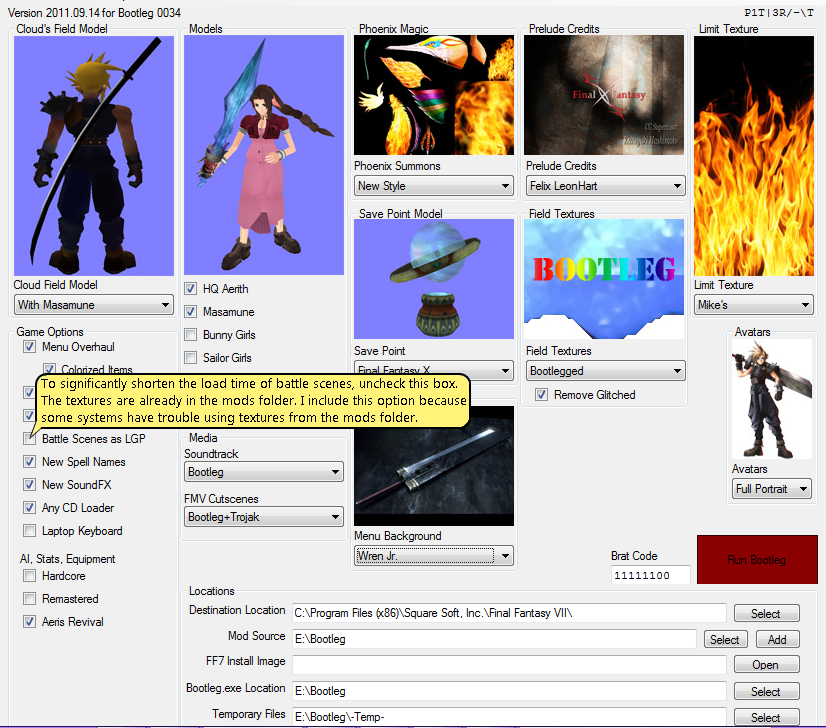
    • Battle Scenes as LGP :

         To significantly shorten the load time of battle scenes, uncheck the box next to
         'Battle Scenes as LGP.'  The textures are already in the mods folder.  I include
          this option because some systems have trouble using textures from the mods folder.
    • AI, Stats, Equipment: Hardcore

         AFAIK, the saves between the 'normal' mode and the 'hardcore' mode are not
         compatible. Read it somewhere. (i am not sure about it)
    • AI, Stats, Equipment: Remastered

         Remix done by titeguy3: Remastered Kernel and Scene changes to AI,
                                                stats and equipment.

         (Which ones ? You know it better then i.)
    • FF7 Install Image

         Archive file of your compressed FF7 folder, so the re-installation goes faster.
    • Brat Code

         A Brat Code is a string of numbers that controls the mods Bootleg installs.
         For more information read "Bootleg_Readme.txt".
    • Temporary Files

         The place where all needed files for the installation will be stored temporarily.
         Requires minimum 16 GB free space.
 
Last edited:
I've never tested Bootleg on XP.
I just assumed that the registry keys are the same as their Windows 7 32/64 bit counterparts.

If not, I'll figure out a solution for a future release.
In the mean time, you could run ff7config.exe before installing Bootleg.
The registry entries will remain intact if they're different than in Bootleg.
It's sloppy . . . but getting messy never stopped me from having a good time!

bonez89,
Please post your results so that I know if there's something else for me to fix.
 
@PitBrat: FF7 Vanilla installation registry keys on Windows XP.
                VMware let me not run "FF7Config.exe".

Code: [Select]
Code:
REGEDIT4[HKEY_LOCAL_MACHINE\SOFTWARE\Square Soft, Inc.][HKEY_LOCAL_MACHINE\SOFTWARE\Square Soft, Inc.\Final Fantasy VII]"DataDrive"="E:\\""AppPath"="C:\\Programme\\Square Soft, Inc.\\Final Fantasy VII\\""DataPath"="C:\\Programme\\Square Soft, Inc.\\Final Fantasy VII\\Data\\""MoviePath"="E:\\FF7\\Movies\\""DiskNo"=dword:00000000"FullInstall"=dword:00000001[HKEY_LOCAL_MACHINE\SOFTWARE\Square Soft, Inc.\Final Fantasy VII\1.00][HKEY_LOCAL_MACHINE\SOFTWARE\Square Soft, Inc.\Final Fantasy VII\1.00\Graphics]"DD_GUID"=hex:"DriverPath"="""Driver"=dword:ffffffff"Mode"=dword:ffffffff"Options"=dword:ffffffff[HKEY_LOCAL_MACHINE\SOFTWARE\Square Soft, Inc.\Final Fantasy VII\1.00\MIDI]"MIDI_DeviceID"=dword:ffffffff"MIDI_data"="GENERAL_MIDI""MusicVolume"=dword:00000064"Options"=dword:00000001[HKEY_LOCAL_MACHINE\SOFTWARE\Square Soft, Inc.\Final Fantasy VII\1.00\Sound]"Sound_GUID"=hex:"Options"=dword:00000000"SFXVolume"=dword:00000064
 
The Lost Wings mod is finished. I was the one doing the conversion, although I found issues that forces me to re-convert it. I cannot give access to Rebirth unless Bosola allows me to. Total Grudge, while 100% finished up to Mideel, is not available. It is done by Armorvil and only Armorvil and I have it. The final word is his, however. The AV Mod is discountinued and most likely will always be. It will be replaced by Total Grudge (Armorvil even told me that there would be 4 versions, and two of them would "replace" AV at 90%

Also, the COPY setting is better than the IF NOT EXIST setting because it would allow us to make less batch files and WAY less strings. There is one of my thread somewhere in the Archives. FF7 Mod Switching it's called. The batch files are basic but you can eventualy base your work on it. I could also do it for you, to implement it.
 
Thank you for the quick response(s). I'm embarrassed to say that installing .NET Frameworks was in fact the only thing wrong with getting BFE.exe to launch. If I hadn't completely forgotten that I had just reformatted my XP machine yesterday as a result of the frustration installing these mods was creating for me, I would have realized that I had not yet re-installed .NET Frameworks... But hey, at least you don't need to fix anything.

On a side note, Everything seems to be running smooth, except for one thing; battling is suddenly very slow. As if my computer cannot handle it anymore, or it's running at a very low frame-rate... Before using bootleg I was just using Remix, and battles were very smooth(yes, I did a clean install of the game before installing bootleg). I'm re-installing now with "Battle Scenes as LGP" unchecked and seeing if that helps it back to normal. If not, I'll play around with some other options to see what the culprit is (It may be the FFX style menus also or something else that is not included in Remix).
 
@bonez89: ( Don't select the "Team Avalanche HR" option (BFE.exe) it's very CPU intensive.
                     => use the TaskManager (taskmgr.exe) to check the CPU )

                   I don't recommend to use "Battle Scenes as LGP".

                      To significantly shorten the load time of battle scenes, uncheck the box next to
                      'Battle Scenes as LGP.'  The textures are already in the mods folder.  I include
                      this option because some systems have trouble using textures from the mods folder.
 
Last edited:
It wasn't Team Avalanche HR... It's apparently the magochocobo battle scenes. If I delete the battle folder from mods, the battles are as smooth as a baby's ass... I've tried battle scenes as lgp and not as lgp and both make it slow... Am I missing something? If not I'll just have to keep the old battle scenes. Not a big deal.

Seeing as how this is no longer to do with bootleg, this probably off topic. sorry.
 
Last edited:
For Bootleg 0034 and earlier, battle scene PNGs are always installed to the 'mods' folder.
Even when the scenes are present in the LGP, the engine prefers the textures in the 'mods' folder.
Therefore, even when 'Battle Scenes as LGP' is checked, the engine still loads the textures from the 'mods' folder.
Because of the slowdowns, I'm investigating methods of disabling battle scenes.
You can rename the folder .\mods\Bootleg\battle to .\mods\Bootleg\battle.bak to disable the battle textures
Then the engine will load the textures from battle.lgp whether they be the new Magochocobo or default vanilla textures.

I've fixed a few serious bugs in Bootleg 0034.  The biggest issue was with the OpenGL and sound drivers not installing correctly.  This problem appeared when I stopped using the Remix installer.  Until Bootleg 0035, simply run ff7config.exe as administrator to configure the drivers.
 
That's basically what I have done by deleting the battle folder from the mods folder. So if it's loading from battle.lgp after I delete it, it must be the default vanilla textures in battle.lgp, because they definitely aren't the new Magochocobo scenes... It's a shame they slow down so bad that they are unplayabe, because they really look nice.

If the engine were to load Magochocobo's scenes from battle.lgp rather than from the .PNG's would they still be slow or do the same thing? Apparently my battle.lgp is the default battle scenes... Maybe try 'Battle scenes as LGP' then deleting the battle folder from mods?
 
I'm really looking forward to the 0035 release, hopefully that one will miraculously work for me, but take your time and good luck with everything.

You are doing a great job, cheers ;)
 
bonez89,
Install Bootleg with the 'Battle Scenes as LGP' option checked.  Then delete the .\mods\Bootleg\battle folder.
Now the Magochocobo texture packs 1, 1.5 and 2 will load from the battle.lgp file.  Unfortunately there is not an LGP version of pack 3 nor of the initial reactor and train station textures included in Bootleg.

killuminati777,
I've fixed the bug with paths containing spaces.
I hope 0035 works for you too!

I'm slowly implementing all of the suggestions I read in this forum.
Now that some of the most grievous bugs are fixed, I'm prettying up the interface.
 
PitBrat
Everything is installing just fine for me, no errors nothing, but somehow i can't get it to work. It always crashes as soon as i skip the eidoslogo / credits and prior to that i get a error messsage "couldn't start in fullscreen" or something like that.
But anyways keep up the good work mate ;)

I guess its just me and this damn vaio laptop, lol :P
 
killuminati777,
Do you use a second screen?
I had the same problem after I connected a second monitor.
I resolved the issue by using compatibility mode.
    Right click on the Final Fantasy VII desktop icon that you use to launch the game.
    Select PROPERTIES
    Select the COMPATIBILITY tab
    Check the boxes next to everything in the 'Settings' group box:
        Run in 256 colors
        Run in 640x480 screen resolution
        Disable visual themes
        Disable desktop composition
        Disable display scaling as an administrator
    Check the box next to 'Run this program as an administrator'
    Click OK

That fixed the issue for me.
 
Status
Not open for further replies.
Back
Top