[FF7] Original and Outdated Tutorial - Bootleg Configurator

  • Thread starter Thread starter PitBrat
  • Start date Start date
Status
Not open for further replies.
That still didn't help at all. I still get a completely black screen. I even tried it in compatibility mode and it's still not working

 
I think it will be easier to make all these files in a torrent file. This is very annoying. You have to download about 100+ files with 150mb each.
 
Hello to all Bootleg users,

if you have downloaded all these files listed in the Mod List of BFE.exe
and you are not sure if your files are not corrupted then i can help you.


Automatic

[list type=decimal]
[*]Download all files from this MediaFire folder
into your Mod Source folder
[*]Start TestFiles.exe and wait ...

Hint :  Ignore file not found messages.
           Look for checksum errors !  (= corrupt file)
[/list]

Test configuration: Intel Core 2 Duo, 2.53GHz

       Bootleg0037: 106 files  19,8 GB (21.339.188.521 Bytes)
                    (You don't need all of them)

          Duration:   7 minutes (MD5        -> checksums.exf)
                   [25 minutes (SHA-512 -> checksums (slow).exf)]

As you can see, there are two checksum files.
If you want to try the SHA-512 version, you have to rename
   checksums.exf             to  checksums (fast).exf  and
   checksums (slow).exf  to  checksums.exf.


Manually

Open Files.txt with any text editor (Notepad, ...) and compare
the size (bytes) of the listed files with your downloaded files.


Happy checksum'ing    :)
 
Last edited:
Did you uninstall and then reinstall?
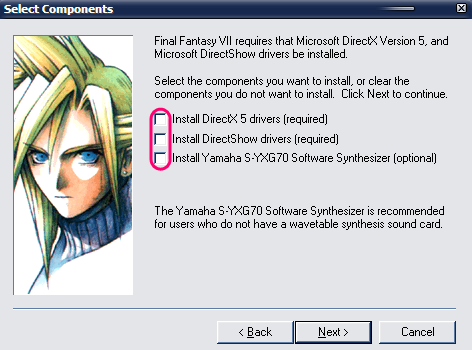
Yes multiple times and it didn't help, but I figured it out. I can't get it into full screen for some reason but I can at least play it, mods and all
 
You have to edit the OpenGL file manually and set the x and y dimensions to your monitor resolution.  You can also edit it from the Bootlegger.
 
Hi strife98,

your problems my solutions ...


Q: Also when I play Final Fantasy 7 without the mods, the game starts but it doesn't run the
         video's. The squaresoft vid with the chocobo's doesn't show up at all, and when I start a
         new game the screen stays blank. No stars, no Aeris nothing.

       Running vanilla FF7 starts the game but it doesn't play the intro cinimatic for the new game
         and doesn't go past it.

A: This is the minimal installation to play the game with the movies:

[list type=decimal]
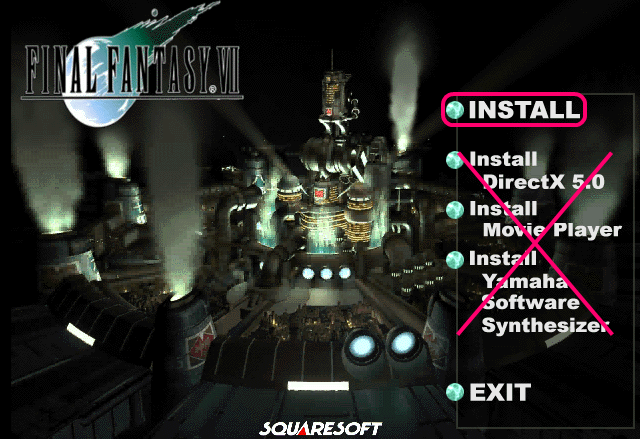
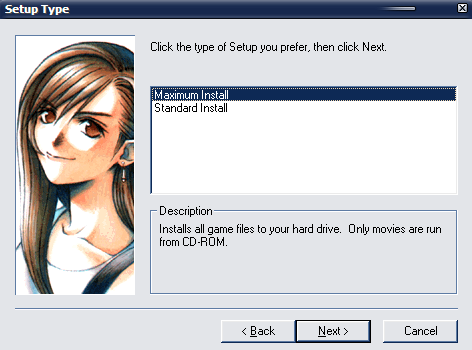
[*]Final Fantasy 7, english, Maximum Install

      
[*]Patch 1.02 (ff7102zx.zip)
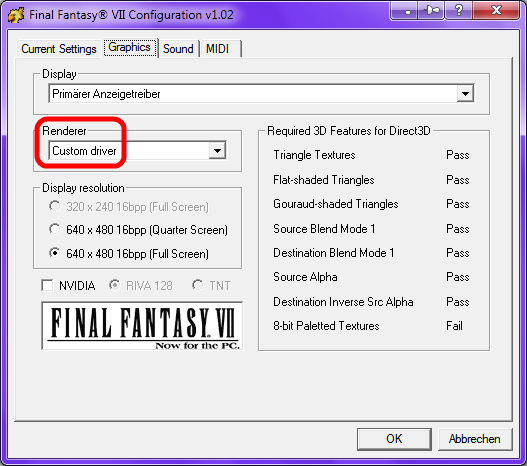
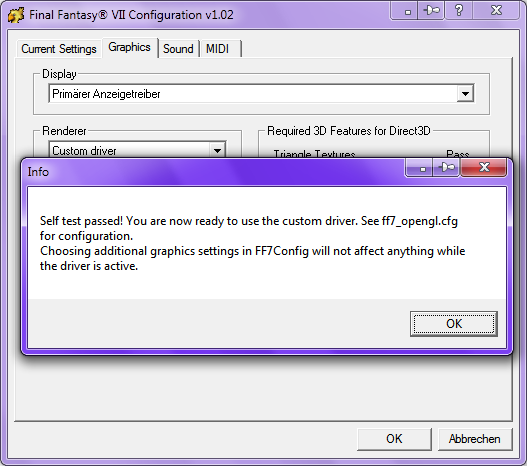
[*]Aali's Custom graphics driver for FF7 >Look here< (scroll down to the bottom)


  • Run FF7Config.exe
  • Graphics: Renderer = Custom driver

       
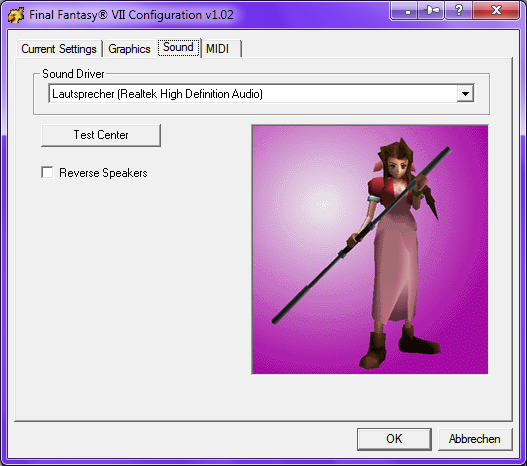
  • Sound: select Sound Driver
                => Test Center/Left/Right

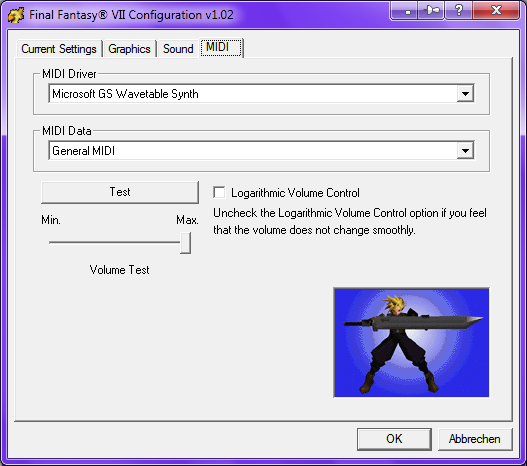
  • MIDI:MIDI Driver=Microsoft GS Wavetable Synth
            MIDI Data  =General MIDI

            => Test
                 => Min./Max. Volume Test
                      => Logarithmic Volume Control on/off

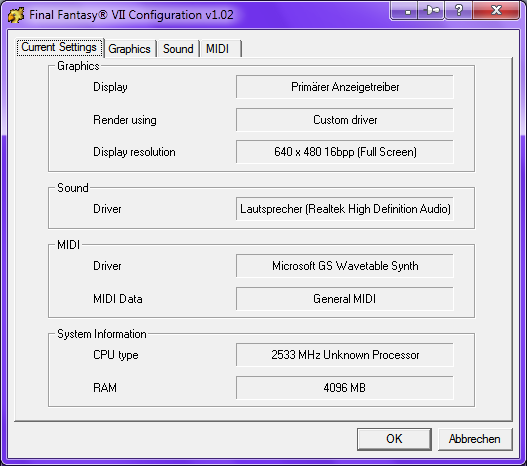
  • Result


If you want to play all the movies from your HD and not from the CD's,
you must do this:


[list type=decimal]
[*]Create a folder named movies in your FF7 folder
[*]Copy all movies from your CD's (*:\ff7\movies\*.*) to this folder.
(overwrite? => YES)
[*]Download ff7moviedirr2.zip and decompress it.
Execute    ff7moviedir.exe   and chose the folder you have created.
[/list]
[/list]


Q: Bootlegger doesn't even start and I don't know how to fix it.

A: Read BFE_Readme.txt and Bootleg_Readme.txt
...
Do a MAXIMUM INSTALLATION of Final Fantasy VII preferably to a non-system folder such as D:\Games\FF7 (Prevents privilege errors and missing mods).
...
Bootleg.exe must run with administrator privileges and will request administrator access.
...
Q:Why does BFE.exe fail to run with the error "The application failed to initialize properly (0xc0000135)"?
A:You need to install the Microsoft .NET Framework 2.0 from: http://www.microsoft.com/download/en/details.aspx?id=19
  Use Windows Update to install the latest version of the .NET Framework.
...
Q:Why does Bootleg exit without displaying Bootleg_Readme.txt?
A:Bootleg has crashed.
  Disable UAC and turn off virus scanning software.
  Avoid using spaces and non U.S. characters in the mod path.
...
Q:Do I have to disable my virus scanner?
A:Bootleg runs fine with virus software enabled.
  The authors of some of the supported mods-- FF7Music and Menu Overhaul-- suggest disabling virus scanning software before installation.
...

!: Put your downloaded mods and BFE.exe+Bootleg.exe in a non-system
     folder such as D:\Bootleg (prevents privilege errors).


Q: I get two errors, one says:
          "You have an error in your config file, some options may not have been parsed."
       And when I click OK another error comes up saying:
          "Error loading movie plugin, cannot continue."

       I can't get it into full screen for some reason.

A: I need the following data for further analysis:
       (upload the ZIP'd files onto MediaFire)

  • Used options (BFE.exe -> Presets:SAVE)
  • Bootleg.log
  • APP.log
  • ff7_opengl.cfg
  • Run dxdiag.exe -> SAVE:DxDiag.txt


Last edited:
I just tried this out and everything works well...except for the Laptop Keyboard Patch. It won't let me get past the character naming screen. The arrow keys won't work and neither will the Enter button (the default OK button for laptops), so I can't move the cursor to the Select option that lets me proceed. Did anyone ever figure out a way to get around this?

On a more positive note, this Bootleg Configurator is amazing! This is probably the easiest time I've had modding Final Fantasy VII. Thanks a lot for making this!
 
Hi strife98,

your problems my solutions ...
Thanks, I had already figured it out. I always did a maximum installation. I just had something that wasn't installed, thanks for your help, but now I have another problem. While I'm playing FF7 with mods, it runs fine, but it freezes after a while. When I open task manager I notice that it has been freezing when FF7 reaches 1.6mill k memory in the Processes tab. So far it's been constant, whenever it hits in between 1.6 mill kb and 1.7 mill kb the game freezes. Is there any way to fix this? It doesn't freeze at anything in particular, it just slowly starts increasing in memory starting from around 200,000 kb and freezing at around 1.6mill kb
 
@Klaw117: I hope this helps (Laptop Keyboard Patch)

I have a new issue with mine...upon opening the game again, no keyboard input seems to register for some reason.  I'm trapped at the New Game/Continue page.  Until now, I could use WASD, and the default was the arrow keys... O.o

EDIT: I resolved the issue by finding a differently-edited ff7input.cfg file and copying it over the existing one.  I have no idea why whatever happened happened.
 
@Klaw117: I hope this helps (Laptop Keyboard Patch)
All right, thanks, but where can I find another ff7input.cfg file to download?

Also, I just ran into another problem. I was reinstalling the Bootleg mods and for some reason, it doesn't go past "Installing FF7Music..." I waited an hour, but still nothing. I downloaded the ff7music_install_15112.exe file since I found out that I didn't have it, but it doesn't seem to be working (I also downloaded some other files that were red in Bootleg's mod list, but not located in the Mediafire Disaster Recovery Folder). Is the file corrupted or something? I downloaded it from RapidShare, which took all night since RapidShare hates free users...maybe something went wrong during the download?
 
I found mine via google search.  Someone had posted a modified config file.
 
@Klaw117:  FF7Music Installer          => MediaFire folder
                    Laptop Keyboard Patch => MediaFire

                    If you want to check your downloaded files: TestFiles


@Iecerint: Can you upload your version of the Laptop Keyboard Patch ?
                  Every version i found via Google is the same as used with the
                  Bootleg installation.


@strife98: Thanks for sending me your files for analyzing.

[list type=decimal]
[*]Backup your save games (.\save\save*.ff7)
[*]Deinstall FF7 completely
[*]Don't place your mods (Mod Source) onto your Desktop.
Create a folder on your C: partition (e.g. C:\Bootleg) and move
all mods + BFE.exe + Bootleg.exe into it.
[*]You have changed your DPI setting:  120 DPI (125 percent)
Change it to normal                        :     96 DPI (100  percent)

Hint: hit the Windows-Key and write DPI
[*]Start your installation
[*]ff7_opengl.cfg

window_size_x = 640  or  1280
window_size_y = 480  or    960

fullscreen = yes

use_shaders        = no  <== only if you have graphic problems
compress_textures  = no           "
fancy_transparency = off          try this also
[*]Time to play   ;)
[/list]
 
Last edited:
@strife98: Thanks for sending me your files for analyzing.
No problem, thanks for the help. Now...do you have a solution as to why on the other computer it starts at 200,000 KB memory in the task manager processes tab, and slowly grows until it hits somewhere between 1,600,000 and 1,700,000 KB mem and then freezes? I was told by a friend it might be my computer since it's about 5 years old, and that it may also be that I'm running windows 7 on it and it came with windows vista that running ff7 with the mods on windows 7 is just taxing out my computer. I don't have the best video card, and it -is- a laptop (tho thankfully one with the numberpad) So anything you need to figure this out or am I just SoL on playing FF7 continuously on this computer?
 
@strife98: First i have to say that your installation i have analyzed is
                 totally broken. You must do a new installation.

                 Second, the problem on your other computer:

  • you know which data i need for analyzing  ;)
  • try to use the minimal installation i described here:

    A: This is the minimal installation to play the game with the movies:


    [list type=decimal]
    [*]Final Fantasy 7, english, Maximum Install
    ...
[/list]
 
Last edited:
UGerstL, maybe it's better not to use the terminology "minimum installation" because stupid people might get confused and do a minimum install instead of a maximum.
 
@Prince Lex: Thanks, i thought the same as i had written minimum.
                      First i was using minimal, but i wasn't sure to leave it.
                      Corrected  ;)

                      I hope that minimal is less confusing.
                      Also i used the BIG Maximum (which no one sees).

                      Btw, we don't have stupid people at Qhimm. *cough* *cough*
                      We are all learning, every damn day.
 
Last edited:
I'm adding features for the next release of Bootleg.
Here's what I've already done:
    Updated Glitched Field Textures List
    Added DLPB's Timing Patches for the Bombing Mission audio and the Coaster Minigame: BombingFix.exe and CoasterAimerFix.exe
    Added Grimmy's PRP Addon Field Models (54 Improved Models), Battle Models (Hi Res Cloud and Shirtless Sephiroth), Huge Materias and Weapons Fixes: prp models.zip, Huge Materias.7z
    Added Grimmy's Upscaled Magic Textures
    Added Avatar Options-- Zendar's Round AC, Zendar's Round AC V2 and Singular Ones Transparent AC: AC Avatars By Zendar.exe and Singular One's Trasnparent Shadow Avatars.zip
    Added New Menu Background Options-- Zendar's AC Buster Sword: AC Buster Sword at Midgar Menu Background By Zendar.exe
    Added Support for Enhanced Movies 1 in 3 Parts and Enhanced Movies 2 in 4 Parts
    Recovered Missing Rumbah Movies
    Updated Millenia's, Slayersnext's and Mike's Weapons Mods with Grimmy Fixes
    Updated Log File Formatting and Corrected Typos
    +Fixed Missing Mod Errors
    +Fixed JordieBo Credits Errors
    Integrated Mods: BombingFix.exe, CoasterAimerFix.exe, AC Avatars By Zendar.exe, Singular One's Trasnparent Shadow Avatars.zip, AC (Round Edge) Avatars [Sephiroth Ver.1 Patch].exe,  AC (Round Edge) Avatars [Tifa Ver.2b Patch].exe, AC (Round Edge) Avatars By Zendar [Ver.1.2].exe,  AC (Round Edge) Avatars By Zendar [Ver.2].exe, AC Buster Sword at Midgar Menu Background By Zendar.exe, Huge Materias.7z, prp models.zip

I've quite a few more features on the TO DO list.
If you have any suggestions, please respond!
 
@PitBrat: I am analyzing several user problems at the moment. As usual, i will inform you
                about needed corrections.  :)
 
I'm adding features for the next release of Bootleg.
Here's what I've already done:
    Updated Glitched Field Textures List
    Added DLPB's Timing Patches for the Bombing Mission audio and the Coaster Minigame: BombingFix.exe and CoasterAimerFix.exe
    Added Grimmy's PRP Addon Field Models (54 Improved Models), Battle Models (Hi Res Cloud and Shirtless Sephiroth), Huge Materias and Weapons Fixes: prp models.zip, Huge Materias.7z
    Added Grimmy's Upscaled Magic Textures
    Added Avatar Options-- Zendar's Round AC, Zendar's Round AC V2 and Singular Ones Transparent AC: AC Avatars By Zendar.exe and Singular One's Trasnparent Shadow Avatars.zip
    Added New Menu Background Options-- Zendar's AC Buster Sword: AC Buster Sword at Midgar Menu Background By Zendar.exe
    Added Support for Enhanced Movies 1 in 3 Parts and Enhanced Movies 2 in 4 Parts
    Recovered Missing Rumbah Movies
    Updated Millenia's, Slayersnext's and Mike's Weapons Mods with Grimmy Fixes
    Updated Log File Formatting and Corrected Typos
    +Fixed Missing Mod Errors
    +Fixed JordieBo Credits Errors
    Integrated Mods: BombingFix.exe, CoasterAimerFix.exe, AC Avatars By Zendar.exe, Singular One's Trasnparent Shadow Avatars.zip, AC (Round Edge) Avatars [Sephiroth Ver.1 Patch].exe,  AC (Round Edge) Avatars [Tifa Ver.2b Patch].exe, AC (Round Edge) Avatars By Zendar [Ver.1.2].exe,  AC (Round Edge) Avatars By Zendar [Ver.2].exe, AC Buster Sword at Midgar Menu Background By Zendar.exe, Huge Materias.7z, prp models.zip

I've quite a few more features on the TO DO list.
If you have any suggestions, please respond!
That's so great!!!!!!!! Please feel free to use my intros (if you agree of course) I will surely be honored https://www.ff7catalog.com/threads/8588/
 
Last edited:
Status
Not open for further replies.
Back
Top