[FF7] Tutorial for Bootleg - Tifa's Bootleg

  • Thread starter Thread starter EQ2Alyza
  • Start date Start date
Status
Not open for further replies.
FF7Music is needed during running of the game, and so is ran all the time. The music starting later in the intro is intentional and normal behavior.

I think you got it backwards. You need to configure your settings in the Bootleg Front End, then hit "Run Bootleg" to install. You cannot change your settings once installed, you need to re-install.
 
... Oh. Well, that definitely makes me feel like a giant moron, but I suppose that makes sense. Don't know why I assumed it was more flexible than that. Thanks for the information, I'll just do a clean install and be very, very sure about how I want everything to look before I proceed.

So there's absolutely nothing in those menus that I can change after I run bootleg install? Even slight cosmetic things? Haven't tested that out yet, but probably not, if I'm understanding what you're telling me.

Thank-you. I really appreciate the help, hopefully I didn't make you facepalm too hard when you read my post.  ;D
 
With the (godly awful, unpractical, brain-aching and cringing) way it's coded, this cannot be done, sadly.
 
➣ I can't see the counters for the Shinra Mansion Safe, Junon Parade, Gaea's Cliff, Rocket Launch Countdown, etc.

    Make a backup of [gamedir]\mods\Bootleg.
    Install Menu Overhaul with "Re-Translation Project [R04]" checked.
    Go to [gamedir]\mods\DK and copy all its contents to [gamedir]\mods\Bootleg. Overwrite everything when asked.
    Open up Bootloader Configure and change the Mod Path back to "Bootleg" OR open ff7_opengl.cfg with Notepad and edit mod_path = Bootleg. Be sure to save the file.
    Play the game passed the counter and save right after.
    If you don't like the translated text, run Menu Overhaul again with "Uninstall this mod" checked at the bottom.
    Go to the backup from Step 1 and copy all its contents to [gamedir]\mods\Bootleg. Overwrite everything when asked.
I followed these Instructions and got it to work.


Anyway, now I got another problem with the Countdowns on the train chase in Corel. The Countdown runs at twice the speed, making it impossible to stop the train in time.
How can i get the timer to run at normal speed?

Edit: I used the EQ2Alyza preset for my Bootleg installation.
 
Last edited:
Oh you followed that bit. e.e When I did that, just to get Vincent, I wasn't able to have my loaded models or anything until I got Vincent. So, meh.
 
Okay, concerning the retranslation project fixing the time counters I need for the Shinra Mansion and the train. I have to say it worked. BUT.. I did it on an initial install of Bootleg with a fresh install . I dislike the retranslation, but, I will work with it and get my happy self over it.  I wanted to keep the original , but meh.  I have canon names, items and american spelling checked. It fixed everything with the retranslation checked.  To the point at hand, i'm good now. e.e After weeks of tests, i'm good.

Edit: Scratch that, I checked the american spelling thing and it just retranslated anyway. The duck man!?
 
Last edited:
Bootleg is strawberries old, what you're seeing is the old Menu Overhaul, which is sadly what Bootleg has. Reunion can be installed afterwards, but then troubleshooting is up to you.
 
Hm, mind giving me the thread through pms to the Reunion?  I would like to do this so I can have my chosen files from bootleg, fix the counter issue but keep the original American text.
 
Are some of the soundtrack options broken or is that just me? I tried to use FFTim's OGG for example and got nothing. I also don't know what "The Remix" and "Bootleg" are. I'm trying to remember what  OST options I used last time.... It sounded like FFTim's stuff but maybe not. Was that incorporated into "Remix" or "Bootleg"?
 
Hm, mind giving me the thread through pms to the Reunion?  I would like to do this so I can have my chosen files from bootleg, fix the counter issue but keep the original American text.
Did you choose any difficulty mod from Bootleg? Reunion "Beacause" is the updated ReTranslation from Menu Overhaul. Keep in mind that it alters files that are associated with most difficulty mods as well, so all you could be doing is a work-around to one problem while creating another.
 
I have this issue already assessed . Thanks to VGR giving me the bump to the Reunion project. I got the changes I needed, I had no difficulty mods chosen in bootleg, just the normal original mod. <3
 
I tried everything I uninstall and reinstall 3 times but no sound or music in game; just fmv s including sounds.  I am using win 8.1 64 bit laptop.

my app log

INFO: FF7/FF8 OpenGL driver version 0.7.11b
INFO: Auto-detected version: FF7 1.02 US English
INFO: Intel Intel(R) HD Graphics 2.1.0 - Build 8.15.10.2900
INFO: OpenGL 2.0 support detected
INFO: Using PBO
INFO: Found swap_control extension
INFO: Max texture size: 8192x8192
INFO: Number of texture units: 8
INFO: Original resolution 640x480, window size 1280x720, output resolution 960x720, internal resolution 1280x960
INFO: FBO extension detected, using fast scaling/postprocessing path
INFO: Shader limits: varying 41, vert uniform 512, frag uniform 1024
INFO: vertex shader compile log:
No errors.

INFO: fragment shader compile log:
No errors.

INFO: main program link log:
No errors.

INFO: FFMpeg movie player plugin loaded
INFO: FFMpeg version SVN-r25886, Copyright (c) 2000-2010 Fabrice Bellard, et al.
INFO: FF7Music helper plugin loaded
INFO: Loading external library Multi.dll
LOCK UNLOCK TEST
MATRIX INITIALIZE
INITIALIZE DD/D3D END
initializing sound...
creating dsound primary buffer
reading audio file
loading static sounds
sound initialized
set music volume: 127
Entering MAIN
Exiting MAIN
START OF CREDITS!!!
INFO: E:\Oyun\Steam\SteamApps\common\FINAL FANTASY VII\movies\eidoslogo.avi; h264/aac 1280x960, 15.000000 FPS, duration: 10.193000, frames: 153
INFO: vertex shader compile log:
No errors.

INFO: fragment shader compile log:
No errors.

INFO: yuv program link log:
No errors.

INFO: E:\Oyun\Steam\SteamApps\common\FINAL FANTASY VII\movies\sqlogo.avi; h264/aac 1280x896, 15.000000 FPS, duration: 14.605000, frames: 219
set music volume trans: 127->0, step=60
END OF CREDITS!!!
Entering MAIN
set music volume: 127
Exiting MAIN
START OF MENU SYSTEM!!!
END OF MENU SYSTEM!!!
Entering MAIN
Exiting MAIN
Field Start
Field Quit
Entering MAIN
Exiting MAIN
Entering FRAME_INITIALIZE SWIRL
Exitting FRAME_INITIALIZE SWIRL
Swirl sound_effect1
stop_sound
End of Swirl sound_effect1
Entering FRAME_QUIT SWIRL
Exitting FRAME_QUIT SWIRL
Entering MAIN
Exiting MAIN
[BATTLE] Entering FRAME_INITIALIZE
[BATTLE] Scene# 303
[BATTLE] Exitting FRAME_INITIALIZE
WM_CLOSE
[BATTLE] Entering FRAME_QUIT
[BATTLE] endof battle.
[BATTLE] Exitting FRAME_QUIT
Field Quit
UNINITIALIZE DD
END UNINITIALIZE DD

my ff7_opengl_cfg

# ff7_opengl-0.7.11b config file - modified by Bootleg


## USER OPTIONS ##
## If you just want to play the game, these are the only options you'll want to change.

# set the window size (or fullscreen resolution) of FF7
# 0 means use original resolution (whatever ff7.exe provides)
# preserve_aspect adds black borders as needed to preserve a 4:3 aspect ratio
window_size_x = 1280
window_size_y = 720
#internal_size_x = 3840
#internal_size_y = 2160
preserve_aspect = yes
fullscreen = yes

#window_pos_x = -1
#window_pos_y = -1
#widescreen_hack = yes

# mod directory
# subdirectroy of mods/ where textures will be loaded from
# does not affect the old external textures feature, those should still go in textures/
mod_path = bootleg

# check your driver settings if this option doesn't seem to work
enable_vsync = yes
#refresh_rate = 60

# limit snowboard, coaster and highway minigames to refresh rate / 2, i.e. 30fps for a 60hz display mode
# vsync must be enabled and working for this to have any effect
minigame_framelimiter = on

# same thing, but for the battle swirl
battleswirl_framelimiter = off

# allow FF7 to use linear filtering for its textures
# some things look slightly better with this option on, but alot of textures just lose their detail
linear_filter = off

# plugin used to play music, the FF7Music plugin MUST be enabled for FF7Music to work.
# If no music plugin is loaded the game will play MIDI as usual but FF7Music will NOT work.
music_plugin = plugins/ff7music.fgp


## ENHANCEMENTS ##
## All the little extras that weren't part of the original game, default options include only trivial bug fixes.

# make all dialog boxes transparent, same effect as the transparent dialog boxes YAMP patch
transparent_dialogs = on

# allow max hp/mp to go over 9999, same effect as the YAMP patch by dziugo
break_9999limit = no
#new_hp_limit = yes
#new_mp_limit = yes

# include armor in magic defense calculation
mdef_fix = yes

# expand battle viewport to cover entire screen and make the battle menu transparent
new_battle_interface = on

# post-processing shader, used to apply fullscreen effects
enable_postprocessing = no
post_source = shaders/SmartBloom.post
yuv_source = shaders/yuv.frag
frag_source = shaders/main.frag
vert_source = shaders/main.vert


## ADVANCED OPTIONS ##
## Don't fiddle with these unless you know what you're doing.

# use shaders, if available and supported
# turn shaders off to use the OpenGL 1.1 backend
use_shaders = yes
#enable_lighting = yes
#show_light_rays = yes
#show_normals = yes
#show_tbn_space = yes
#max_lights = 12

#Variable Functions#
#specular_fog = yes
#texture_scale_bias = 1
#texture_coordinate_clamp = yes
#pixel_texture_bits = 32
#generate_mipmap = yes
#detail_texture = yes
#shader_precision = yes
#tessellation_program5 = yes
#multisample_coverage = yes
#multisample_filter_hint = yes
#texture_filter_anisotropic = yes
#texture_edge_clamp = yes

# prevent glitches due to rounding errors by rendering in the nearest (larger, if supported)
# multiple of the original resolution and up/down-scaling
prevent_rounding_errors = yes

# enable alpha blending for textures without an existing blending effect
fancy_transparency = on

# display frames per second counter in upper right corner
show_fps = no
skip_frames = no

# display some real-time debug information
show_stats = no

# store external textures in a compressed cache for increased performance
# compression is not lossless, some artifacts may appear when this option is in use
# texture cache does NOT update automatically if the source image changes, however, deleting anything from the cache
# will cause that file to be recreated from the source
compress_textures = no

# use pixel buffer objects to speed up texture loading
# will probably crash horribly on ATI cards but should work for NVIDIA users
use_pbo = yes
use_vbo = no

# replace FF7's default framelimiter timer source
use_new_timer = yes

# use a more stable (but less accurate) timer to control FF7's framelimiter
# this option has no effect unless the use_new_timer option is on
use_stable_timer = yes

# plugin used to play movies, FFMpeg is the only choice for now
movie_plugin = plugins/ffmpeg_movies.fgp


## MODDER OPTIONS ##
## These options are mostly useful to modders and should not be enabled during normal play.

# read files directly instead of using LGP archives
# for example; if FF7 is looking for aaab.rsd in char.lgp, this option will make it open direct/char/aaab.rsd first,
# if this file doesn't exist it will look for the original in the LGP archive
direct_mode = off

# show every failed attempt at loading a .png texture
show_missing_textures = no

# Disable Error Notifications
disable_popup = on

# Load Multiple DLLs
load_library = Multi.dll

 
I need some help here.
First of all, I wish to change all cutscenes to the completely fan made ones, (with clips from AC, CC etc.) So the question is: What should I pick in the box where I chose what kind of FMV pack I want?

It's driving me nuts that I can't get the music to work. I have downloaded the the patch and run it inside the game folder, but nothing happens.

Also, when I start the game it says that an error occurred when trying to use full screen.
 
I need some help here.
First of all, I wish to change all cutscenes to the completely fan made ones, (with clips from AC, CC etc.) So the question is: What should I pick in the box where I chose what kind of FMV pack I want?

It's driving me nuts that I can't get the music to work. I have downloaded the the patch and run it inside the game folder, but nothing happens.

Also, when I start the game it says that an error occurred when trying to use full screen.
For music; uninstall game delete game folder and reinstall. When settings bfe.exe before install uncheck 9999 break. I tried like that and the music problem is fixed.
 
For music; uninstall game delete game folder and reinstall. When settings bfe.exe before install uncheck 9999 break. I tried like that and the music problem is fixed.
Still doesn't work. I reinstalled the game and the mod, but now I can't even use the music patch.
 
I was using mods on FF this month and run bootleg without problems, but I have a mini-question. Is there a way to install only one mod? For example, I want to change harcore to nightmare mod, or I want to change one char model to other but you have to install all mods... thanks for helping!
 
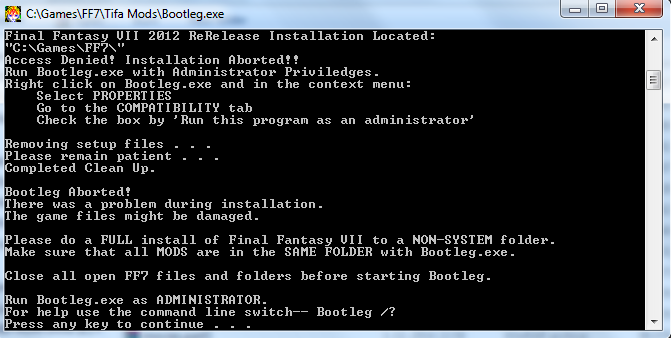
Thanks for the amazing guide!! Really looking forward replaying this gem with some updated graphics HOWEVER
i'm stuck with a problem
d1AxvVO.png


The thing is I've set both programs to run as admin in compatibility turned my UAC off all my mods are GREEN etc
but still I get this message of run the program as ADMIN :( Anyone know what possibly could be wrong
 
It's the installation you have the game in.  You have to install the game into your Hard drive, in a new folder not in the games folder but the hard drive itself . For instance. C:\FF7epic\Final Fantasy VII .  When you create that folder, whatever antivirus you have, you need to set the exclusions for scans so it doesn't interrupt. Right click and select properties on the installed folder,  Turn off your anti virus before running bootleg. Where it says "Read-Only" click it so it's OFF or emptied. Apply, and include subfolders. 


Edit - Forgive the ignorance, looked at the photo and saw you did have the 2012 release.
Oh I forgot to state that yes it's the FF7 from Square-Enix shop

So it doesn't work because it's in the games folder!? Must I do a full unistall/reinstall directly to C:\ or does simply moving the folder help?
Not on my PC otm but will update as soon as I get home
 
Oh I forgot to state that yes it's the FF7 from Square-Enix shop

So it doesn't work because it's in the games folder!? Must I do a full unistall/reinstall directly to C:\ or does simply moving the folder help?
Not on my PC otm but will update as soon as I get home
A fresh install will help.  Like I said, do a fresh install to the drive C:\ in any folder you create in that area.  Then follow the steps I provided.
 
Status
Not open for further replies.
Back
Top