[FF7PC-98/Steam] Multiple mods and Modding Framework-The Reunion [R06f]

  • Thread starter Thread starter DLPB_
  • Start date Start date
Status
Not open for further replies.
This is strange. Now my copy of FF7 won't start at all after the crash. I think I might have to wait until the issues with Steam are ironed out before starting my playthrough.

 
I just wanted to tell you thank you for your hard work I have been waiting awhile for this mod. I am using the vanilla Steam version and I having none of the problems listed above I can share my logs with you if you need and will help anyway I can. Remember guys read the Doc the front page and/or watch the video before launching a complaint it saves time and energy. I see this kind of issue on the nexus all the time and its because they didn't read the description of the mod or the boards before posting. With that said I look forward to watching this grow. Good luck mate!
 
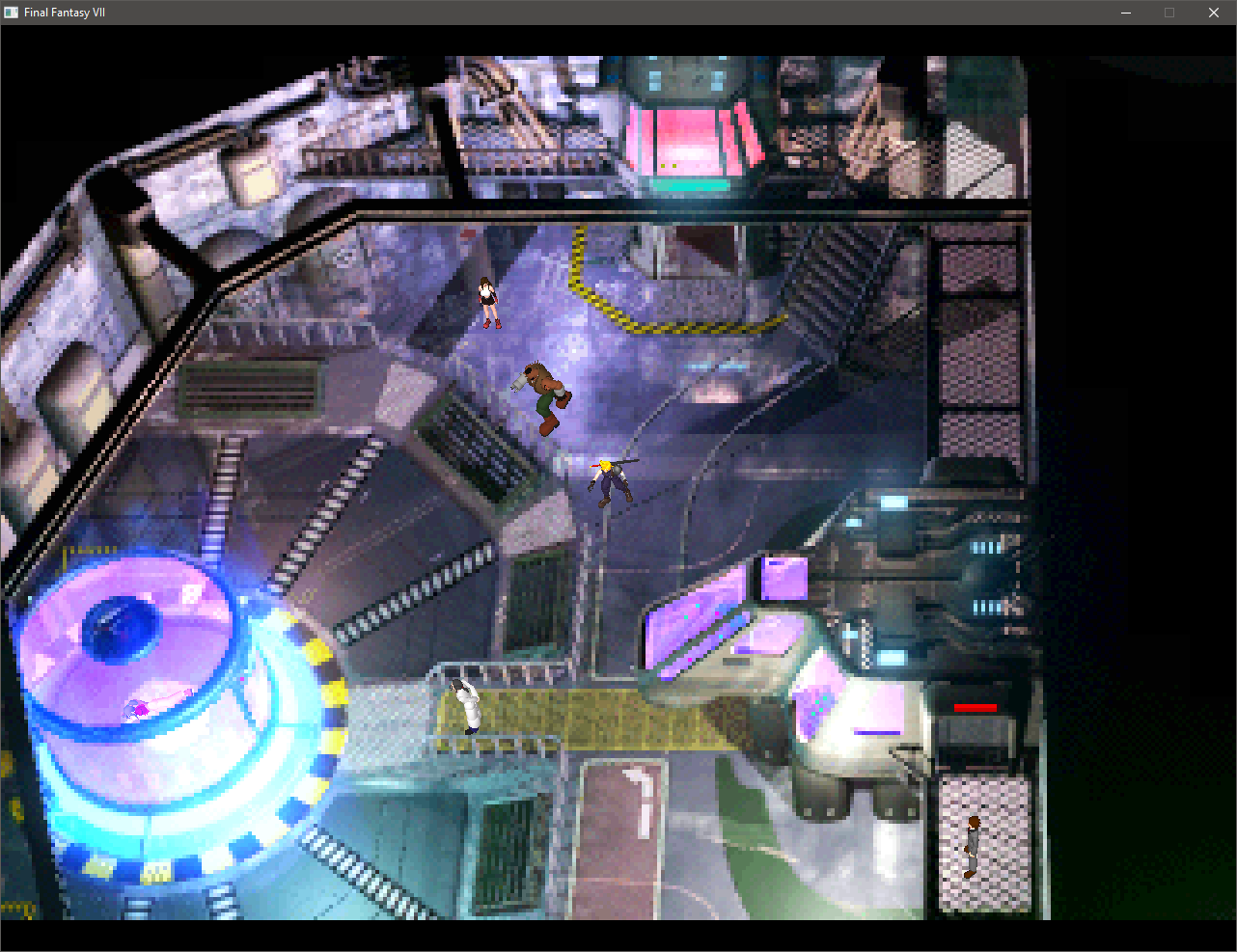
Ran into an issue today during a cutscene which ended up locking my game - on the 68th floor of the Shinra building when you ride the elevator up into the specimen room and confront Hojo, there's a part where Barret runs forward but gets stuck on a fence or railing, and just runs in place forever without continuing the scene.  I had this happen too in the Honeybee Manor when going to the "Group Hive" - one of the guys got stuck on the bed and the scene never continued playing.  I was able to avoid that by going to the other room in the manor but I can't get past this scene in the laboratory.
6Sczhdi.png
 
Hello. I'm at a bit of a loss here -- I reached Rocket Town and spoke to Cid at the rocket, headed back to his house, where Palmer shows up and Cid heads outside. When I follow him, the screen goes black and the next scene just doesn't load. I tried toggling on / off pretty much every setting and nothing works. It seems I simply can't get past this point in the game, and I dunno if it's something on my end or a problem with the mod. I can't attach files but I saw someone above use the code feature so I'll try pasting the contents of the log from my most recent attempt in there.

The_reunion.log

https://pastebin.com/cz874mJg

app.log

https://pastebin.com/EcdDeyDT

audio.log

https://pastebin.com/Kuit0dzM
Update to this one: I disabled the New Translation in options.ini and I was finally able to progress. I looked at the app.log after most attempts before this one and it always seemed to stop at "TRACE: open EEEF.P (LGP:char)" so perhaps there's an issue with that file. I kept the save just before that scene so tomorrow I may try a fresh reunion install (in case of an error during installation) and see if I run into it again.
 
Another report, in the beginning of the game, just before the pillar crashes down, when I got to the top of the pillar and try talking to Barret, Tifa starts running and gets stuck, no way to progress.

I'll see if I can recreate it, and post some logs.
 
Update to this one: I disabled the New Translation in options.ini and I was finally able to progress. I looked at the app.log after most attempts before this one and it always seemed to stop at "TRACE: open EEEF.P (LGP:char)" so perhaps there's an issue with that file. I kept the save just before that scene so tomorrow I may try a fresh reunion install (in case of an error during installation) and see if I run into it again.
I look into it tonight. But it's strange that it shows up when the new translation is active. Is there something new in the field scene?
 
It won't be the models doing it - that's just the last instruction. 

Unfortunately, as crash.dmp doesn't appear to be working,there's no real way to trace the root cause at moment. But please supply (you'll need to place files in a zip file and upload to a site, such as Google Drive):


0. Check The Reunion Database - Especially Reunion Bugs tab. https://docs.google.com/spreadsheets/d/1DUjmyW94zcYoX7gIW5yAT4giTPeNmCR4TCaHAiXOLlU
1. An explanation of bug
2. Does the bug happen at same point more than once?
3. App.log
4. Reunion.log
5. And your save file from just before the crash or hang


whenever you make a bug report.  Copy the above template.

For any weird audio issues, please go into options.ini and set this: Load_SFX_To_Memory = n

For any weird crashes that happen - please try to add the following line to options.ini and see if the crash goes away:

[FIXES]
test = y


Do not add that line if you have not experienced any hard crash.
 
Last edited:
Also,don't use the scanlines option in psx.post.  It's not very good.

Use ReShade and configure to taste:
https://reshade.me/

I am going to ask the author if I can distribute it in future.

Additionally, please don't use the converter unless using SquareEnix version.  It's not a good idea - the underlying issue needs to be solved and will be by tomorrow.
 
Last edited:
Thanks Kalathi.  That is indeed helpful.  If I replicate, it will be added to Reunion Database and when I sober up later after my weekly piss up, you'll be provided hot fix.  :)
 
Replicated.  I'll try to fix now but pressed for time as I'm off out.

Edit. Huge oversight there in field code by me.

Will need to be fixed. It's a field code issue caused by infinite loop in INIT section.  God only knows what drug I was on that that ended up there.
 
Last edited:
sweet i can now make a conversion for my sfx mod to work with your audio mod. only downside is i'm forced to use the old cosmo95c tool to extract the wav files. other then that i look forward to testing the new update.
 
Seems to do it with interpolated 60fps only.  Likely code related rather than animation.  Checking.
 
Great job on the release. I think I've found a bug: I started a new game and Cloud's EXP bar seems to go off limits. Apparently this only happens when a new game starts, as soon as you get exp it is fixed.

Image: https://imgur.com/a/Cf1shq2

It only happens when New_Translation is activated.

reunion.log
Code: [Select]
Code:
Mod ID: noneActivated: New translationActivated: Menu EnhancementActivated: Audio ReplacementLoaded: 60fps BattlesActivated: New frame limiterActivated: Centred field screensActivated: Closed Mouth Models [original character models will not have open mouths]Activated: High precision timer (QPC)Activated: Show more status - mode 2Loaded: Submarine text file D:\Program Files\SteamLibrary\steamapps\common\FINAL FANTASY VII\The_Reunion\BASE\New_Translation\text\Submarine.txtLoaded: Chars text file D:\Program Files\SteamLibrary\steamapps\common\FINAL FANTASY VII\The_Reunion\BASE\New_Translation\text\Chars.txtLoaded: Exe text file D:\Program Files\SteamLibrary\steamapps\common\FINAL FANTASY VII\The_Reunion\BASE\New_Translation\text\Exe.txtActivated: Mandatory fixesLoaded: Real ddraw.dllLoaded: Any global DLLs - See hext.logLoaded: Any custom DLLs - See hext.logLoaded: Any global hext files - See hext.logLoaded: Any custom hext files - See hext.logLoaded: Bass.dllLoaded LGP:D:\Program Files\SteamLibrary\steamapps\common\FINAL FANTASY VII\data\menu\menu_us.lgpLoaded LGP:D:\Program Files\SteamLibrary\steamapps\common\FINAL FANTASY VII\data\battle\battle.lgpLoaded LGP:D:\Program Files\SteamLibrary\steamapps\common\FINAL FANTASY VII\data\battle\magic.lgpLoaded LGP:D:\Program Files\SteamLibrary\steamapps\common\FINAL FANTASY VII\data\field\char.lgpLoaded LGP:D:\Program Files\SteamLibrary\steamapps\common\FINAL FANTASY VII\The_Reunion\BASE\New_Translation\flevel.lgpLoaded LGP:D:\Program Files\SteamLibrary\steamapps\common\FINAL FANTASY VII\The_Reunion\BASE\New_Translation\chocobo.lgpLoaded LGP:D:\Program Files\SteamLibrary\steamapps\common\FINAL FANTASY VII\The_Reunion\BASE\New_Translation\condor.lgpLoaded LGP:D:\Program Files\SteamLibrary\steamapps\common\FINAL FANTASY VII\The_Reunion\BASE\New_Translation\world.lgpLoaded LGP:D:\Program Files\SteamLibrary\steamapps\common\FINAL FANTASY VII\data\cd\moviecam.lgpLoaded LGP:D:\Program Files\SteamLibrary\steamapps\common\FINAL FANTASY VII\data\cd\cr_us.lgp
hext.log
Code: [Select]
Code:
=============================================font_spacing.txt (Base)Changed: 256Replaced: 0Permissions: 0No errors.=============================================24/11/2019, 12:31:39 AM
 
Last edited:
this..yes this doesn't want to work for me .. it even calls me a pirate (i guess)
i have a legit FF7 steam copy (version 1.09) and the game launches without the mod every single time .. i have installed it correctly according to what the launcher asks (at the game's directory) and got an extra folder with stuff in it but nothing more .. no extra .exe for example ..i have zero clue what goes wrong with this since no installation guide says if this doesn't work then do that...the only recent post about this i found on here is a few pages back by a guy who none answered to him about this problem ...
is there any way to launch it on steam ? do i have any files missing files ? is there any folders i have to take out of the_reunion folder and put it where the ff7.exe is ? is there a point of the mod asking me if my copy is valid and how do i change that and will that fix the mod and launch ?
 
Last edited:
Not sure if this is known already but there's a bug early in the game, when returning from the Don's place and you enter District 7, the scene where Shin-ra is going to take down the tower and Barret is at the top of a long spiral staircase, when I try to talk to Barret, Tifa runs hyper speed into the pillar in the center of the platform and gets stuck in there, causing the game to get soft-locked, likely because she never reaches some position that she is supposed to before the dialogue starts.

It occurs every time. I've re-launched the game several times trying to find ways around this but it always happens. I'll try disabling some of the options to see if I can get passed this. It's the first major bug I've encountered since starting a new play-through with this mod.

(although there is a minor bug involving models not being in-sync with the pre-rendered backgrounds I've noticed..)
 
The 60fps battle issue with interpolation seems to be caused by the new files.  I'll ping this to Obesebear to have a look.  I think it's entirely related to the Trick Prey enemy.
 
Update:  Interpolated 60fps battles- please delete:

[root]The_Reunion\BASE\60i\battle\hrda

HRDA is broken.  Passing to Obesebear to investigate.
 
Status
Not open for further replies.
Back
Top