[FF7PC][TSUNAMODS] Satsuki Yatoshi Mod - SYW V5 - unsuported anymore

  • Thread starter Thread starter satsuki
  • Start date Start date
Status
Not open for further replies.
Bug spotted, will be solved in the next update (soon)

Great news!  Thank you, will test and respond to this thread after the new version is released.
 
Is there a known issue with the UI z-buffer in battles? The Guard Scorpion clips heavily through the UI as the camera swings around.

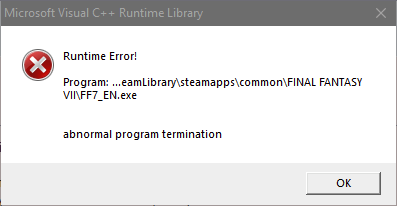
Edit: Also, I paused the game in a battle with three grunts in it and turned away for about 5 minutes. Coming back, the game window is completely black. I can unpause and hear the game but nothing is showing. I'm using the standalone on a vanilla game, no 7th Heaven. I have the Steam Overlay disabled if it means anything. I let it sit another few minutes at the black screen while working on another PC and got this;

T5ASuSq.png


Edit2: I noticed the one-eye blinking bug that apparently is known for the PC version. Was there ever a mod to fix this that could be integrated?
 
Last edited:
Steam AIO update 5.25:
-Auto detect is GPU is D3D12 capable and auto set it at runtime (fix glitchs with some ATI/AMD drivers).
-Updated FFNx (worlmap music resume between battle optimisation).
-Added an option to auto-disable steam overlay for FFVII to avoid bug with some gamepad not working.
-Corrected some localised texts in worlmap.


link in 1° page as usual ^^
 
Hi i got into the original FF7 thanks to the mods again.You've done so much work and i would like to thank you for that,so keep it up!
 Now i would like to add remastered music etc. i tried getting some mods from 7th heaven but i can't get them to work do i need to place them somewhere different in the load order so they won't be overwritten by one of your mods? Sorry if this is off topic please prompt me to where i can find out more if that is thanks.
 
If you're using the iro's version, my mod don't provide a music mod, so just use the music mod you want ^^
 
Great news!  Thank you, will test and respond to this thread after the new version is released.
I'm happy to report that this bug looks to be resolved.  So far, I have not seen any foreign text.

However, I have found another bug that has been introduced since the new update (it did not occur prior with 5.24 or lower).  It occurs when the overworld is first available in the first town, Kalm.  During Cloud's flashback, after Sephiroth leaves the mansion and the city is on fire, the game freezes.

This is what is seen in the log file:

[00014977] ERROR: [Device Lost] _device->CreateCommittedResource(&heapProperty.m_properties , D3D12_HEAP_FLAG_NONE , _resourceDesc , heapProperty.m_state , _clearValue , IID_ID3D12Resource , (void**)&resource ) FAILED 0x8007000e
[00014977] TRACE: *** Exception 0xc0000005, address 0x3155860 ***
.
.
.
[00014977] TRACE: 03155860 (AF3DN): (filename not available): ID3D12Resource::`vcall'{40}'
[00014977] TRACE: D:\a\1\s\bgfx\3rdparty\dxsdk\include\d3dx12.h (1396): UpdateSubresources
[00014977] TRACE: D:\a\1\s\bgfx\3rdparty\dxsdk\include\d3dx12.h (1471): UpdateSubresources
[00014977] TRACE: D:\a\1\s\bgfx\src\renderer_d3d12.cpp (4975): bgfx::d3d12::TextureD3D12::create
[00014977] TRACE: D:\a\1\s\bgfx\src\renderer_d3d12.cpp (1621): bgfx::d3d12::RendererContextD3D12::createTexture
[00014977] TRACE: D:\a\1\s\bgfx\src\bgfx.cpp (3063): bgfx::Context::rendererExecCommands
[00014977] TRACE: 059D9AF0 ((module-name not available)): (filename not available): (function-name not available)
[00014977] TRACE: 77E176B4 (ntdll): (filename not available): RtlGetAppContainerNamedObjectPath
[00014977] TRACE: 77E17684 (ntdll): (filename not available): RtlGetAppContainerNamedObjectPath
[00014977] ERROR: Unhandled Exception. See dumped information above.

Unfortunately, I can't attach the file nor send a PM yet but if you need the file, let me know and I can post to a file host.
 
Hello satsuki!

I downloaded the Installer from the MIRROR server (the main one stopped me after 5 GBs saying that I had to wait 15 hours before I could continue or I could pay for the privilege).

Downloading from the MIRROR server went fine but when I unzipped the content, I got an error message almost at the end (using Bandizip):

"[TSUNAMODS]FF7.SYW.V5.21.installer.nsisbin - CRC error
An error occurred"

I get a generic error even if using Windows 10's own zip extractor so the problem is in the archive.

Do you have any idea of what that is? Has anyone else encountered the same problem?

Thanks!

UPDATE: I redownloaded and this time I got no error.
 
Last edited:
Is there a known issue with the UI z-buffer in battles? The Guard Scorpion clips heavily through the UI as the camera swings around.

Edit: Also, I paused the game in a battle with three grunts in it and turned away for about 5 minutes. Coming back, the game window is completely black. I can unpause and hear the game but nothing is showing. I'm using the standalone on a vanilla game, no 7th Heaven. I have the Steam Overlay disabled if it means anything. I let it sit another few minutes at the black screen while working on another PC and got this;

T5ASuSq.png


Edit2: I noticed the one-eye blinking bug that apparently is known for the PC version. Was there ever a mod to fix this that could be integrated?
look like nothing to do with the mod nor FFNx, seems the ff7_en.exe have bug, could you reproduice the bug 100% time ?


I'm happy to report that this bug looks to be resolved.  So far, I have not seen any foreign text.

However, I have found another bug that has been introduced since the new update (it did not occur prior with 5.24 or lower).  It occurs when the overworld is first available in the first town, Kalm.  During Cloud's flashback, after Sephiroth leaves the mansion and the city is on fire, the game freezes.

This is what is seen in the log file:

[00014977] ERROR: [Device Lost] _device->CreateCommittedResource(&heapProperty.m_properties , D3D12_HEAP_FLAG_NONE , _resourceDesc , heapProperty.m_state , _clearValue , IID_ID3D12Resource , (void**)&resource ) FAILED 0x8007000e
[00014977] TRACE: *** Exception 0xc0000005, address 0x3155860 ***
.
.
.
[00014977] TRACE: 03155860 (AF3DN): (filename not available): ID3D12Resource::`vcall'{40}'
[00014977] TRACE: D:\a\1\s\bgfx\3rdparty\dxsdk\include\d3dx12.h (1396): UpdateSubresources
[00014977] TRACE: D:\a\1\s\bgfx\3rdparty\dxsdk\include\d3dx12.h (1471): UpdateSubresources
[00014977] TRACE: D:\a\1\s\bgfx\src\renderer_d3d12.cpp (4975): bgfx::d3d12::TextureD3D12::create
[00014977] TRACE: D:\a\1\s\bgfx\src\renderer_d3d12.cpp (1621): bgfx::d3d12::RendererContextD3D12::createTexture
[00014977] TRACE: D:\a\1\s\bgfx\src\bgfx.cpp (3063): bgfx::Context::rendererExecCommands
[00014977] TRACE: 059D9AF0 ((module-name not available)): (filename not available): (function-name not available)
[00014977] TRACE: 77E176B4 (ntdll): (filename not available): RtlGetAppContainerNamedObjectPath
[00014977] TRACE: 77E17684 (ntdll): (filename not available): RtlGetAppContainerNamedObjectPath
[00014977] ERROR: Unhandled Exception. See dumped information above.

Unfortunately, I can't attach the file nor send a PM yet but if you need the file, let me know and I can post to a file host.
Could you reproduice the bug 100% time ?
If yes could you try to force the game engine to D3D11 instead of auto ?
Could you try to updage your gpu driver too ?
Witch gpu do you have on the computer ?
 
Last edited:
Is there a known issue with the UI z-buffer in battles? The Guard Scorpion clips heavily through the UI as the camera swings around.
this has to do with hext code applied to the battle menu, the best way to do it is to bring the battle scene to the edge of the UI, but for some reason ffnx and reunion both take the battle scene all the way to the bottom where it can conflict with the UI
 
this has to do with hext code applied to the battle menu, the best way to do it is to bring the battle scene to the edge of the UI, but for some reason ffnx and reunion both take the battle scene all the way to the bottom where it can conflict with the UI
because those "confict" are realy rare and the ui looks better all the way down ^^
 
Could you reproduice the bug 100% time ?
If yes could you try to force the game engine to D3D11 instead of auto ?
Could you try to updage your gpu driver too ?
Witch gpu do you have on the computer ?
1.  Yes, when set to "Auto", the bug is 100% reproducible.
2.  I'm using 3060-TI.  Driver version is 461.72 from 2/25/21.
3.  When I manually select D3D11, the crash does not happen.  Thanks for the workaround!
 
If you're using the iro's version, my mod don't provide a music mod, so just use the music mod you want ^^

Thanks, i had a look around and finally got what i wanted.Nice to to see the game still gets so much love.
 
Loved the mod, but it would randomly delete my save file. I would come back after not playing for a day and have no save. This happened maybe 3 times before having to uninstall. It would only delete my legit in game saves too, never the quick save. Just random, IDK if its an error on my end or what.
 
Ok so seems your nv driver as some d3d broken functions ^^'
For next update i'll force dx11 for nv and dx12 for ati if auto is selected
 
Ok so seems your nv driver as some d3d broken functions ^^'
For next update i'll force dx11 for nv and dx12 for ati if auto is selected
Ah, got it ... ok, when the new driver version comes out, I'll test with 'auto'.  I'll probably rollback my driver to the previous version, since they may be an issue for other games as well.
 
Loved the mod, but it would randomly delete my save file. I would come back after not playing for a day and have no save. This happened maybe 3 times before having to uninstall. It would only delete my legit in game saves too, never the quick save. Just random, IDK if its an error on my end or what.
Do you have only one steam profile or more than one ?
Do you got a game crash before savegame lost ?

Thanks

Edit : ok seems related to FFNX, if game's crash you may loose the same, will be fixed in next update ^^
 
Last edited:
Satsuki,

could you tell me what the difference between the Steam version of the music and the PSX version I can install using SYW V5 is?

And one thing: when I try to lunch the "Unmoded steam version", it does not work. The game never gets loaded.

Thanks!
 
Last edited:
The psx music version is 1:1 psx music decoded by a psx emulator.
The steam music is based on the ost cd.
The psx version is better if you use a good speaker setup because it's not lossy like the ogg steam music.

I can't understant why your unmodded steam version would not work.
are you able to launch ff7 from steam if you check and repair file from steam ?
 
I have followed your instructions and checked the "Validate files" option for the game inside Steam.

It replaced four files that were not valid.

After that, I could run the unmodded Steam version of the game even from the SYW V5 Control Panel.
 
Last edited:
I have followed your instructions and checked the "Validate files" option for the game inside Steam.

It replaced four files that were not valid.

After that, I could run the unmodded Steam version of the game even from the SYW V5 Control Panel.
Ok a file not modded by my pack was corrupted ^^
 
Status
Not open for further replies.
Back
Top