[PSX/PC] Field Editor - Makou Reactor (2.1.0)

  • Thread starter Thread starter myst6re
  • Start date Start date
Status
Not open for further replies.
I have a list of dialogues in txt, can I replace them with those in the game? (PC version)
just use toughscript for that? because it does exactly THAT
replace text ingame with text in txt files
 
you can insert your link?
You can pretty much insert any text into the game
obviously you wont be able to click links


edit:
latest update you gave me still has field files corrupted on occasion ( only very specific field files. I'm thinking this has something to do with messy code and MR corrupts the field because it cant save the bad code properly )
also, you can no longer save edits to the model loader. wtf?
 
Last edited:
latest update you gave me still has field files corrupted on occasion ( only very specific field files. I'm thinking this has something to do with messy code and MR corrupts the field because it cant save the bad code properly )
OK, no release as this bug is still alive.

also, you can no longer save edits to the model loader. wtf?
Yeah.
 
Oh, really works now? You apply opcodes for run these comand in pc?  :P

This is really great news.

Long ago I did not attempt anything that could put as example of asking or remove materia?

Thankssss
 
Last edited:
Not but what I mean is that it will never work on PC, so problem solved, I can't do anything :evil:

Edit: I have not managed to run theses opcodes on PS either...
 
Last edited:
AAARRRRGGGGGG!!!

Not possible fix this problem in future?

It's epic fail not run this comand in game  :-\

This is a problem for me, events designed to "ask materia" for continue or need master! Or exchange materia.

Then deleted possible changes in "pot alchemist"?

Not exist solution? :cry:
 
I wonder why these opcodes don't work
Do they have no actual functional code implemented or do they just not work ingame? If they check in the wrong place ( item menu ) then of course the value coming back would always be 0
I assume the opcodes actual code is handled in the .exe? if so, shouldn't there be a way to insert the missing opcode / correct the code to make this work?
 
Hi Mystere,

I have a doutb about the font which you use in your program, I would like to change for
other small font, I have seen in your sourcecode, it could change the size of the font?

Thanks
 
Not exist solution? :cry:
I'll look at the instructions of these opcodes in the q-gears, maybe I'll understand the problem.

Hi Mystere,

I have a doutb about the font which you use in your program, I would like to change for
other small font, I have seen in your sourcecode, it could change the size of the font?

Thanks
Doubt? What doubt?
If you change the texture, this is not enough to change the size of the font.
 
OK! Makou Reactor 1.5.1 is now online. Download it!

Changelog:

  • AKAO opcodes identified
  • Script Editor: in the window editor, if the opcode is followed by ASK or MESSAGE, the text preview is filled automatically.
  • Script Editor: you can now add a new label when you want to create an "if" or a "jump".
  • Search text: the search field is filled automatically with the current selected text.
  • Non-modal dialogs: do not closing the dialogs when the archive is closed.
  • 3D model: some custom textures are now opened, and optimization.
  • Model loader editor: the dialog is non-modal + add an unknown data associated to animations.
  • Walkmesh editor: background flags editor in Camera range tab.
  • Fix a bug in field file opening
  • Fix a bug in walkmesh editor: the third vertex is not editable.
  • Fix a bug in text editor: {PAUSE...} and {NEW PAGE 2} do not work.
  • Fix a bug in script history: some opcodes (like jump or label) lost some informations.
  • Fix a bug in search text: search previous does not work.
  • Fix a bug with the file lock: the file was not unlocked in some cases.
  • Fix a bug when you import a PC field: the model loader is not saved.
  • Fix a bug with image disc: temp data is not cleared after saving.
  • Fix a bug with image disc: when saving, at the second attemp the progress bar will not shown.
  • Fix a bug (and potential crash) when importing field: non-modal dialog are not reloaded.
  • Fix a bug with kernel2.bin loader: wrong path + rerelased ff7 version unsupported.
  • Bug: wrong appPath if you choose the rerelease ff7 version first.
  • Fix a crash when saving the field background as an image
  • Fix a crash when opening a large texture (*.tex) file
  • Fix a crash when copy/paste group or opcode
  • Prevent some crashes
  • Optimization: Do not reload non-modal dialogs if filled with the same field.
  • Optimization: Do not open the script section if it's not necessary.
  • Some optimizations in LZS algorithms.
  • Updating ZLib to 1.2.7
  • Windows: Updating Qt to 4.8.3
 
Model loader has some problems
for example, adding a model ( fabb ) and the animation to that model ( byhc ) in 1.5 works fine but in 1.5.1 it doesn't display the whole thing as a valid combination ( this even happens with a lot of vanilla models )

edit 1:
FINALLY FIGURED OUT WHAT CORRUPTS THE FIELD LOL
it's some kind of issue with preload_map opcode
I only ever hit that kind of problem after I edited a map that contained that opcode
ealin_12 contains the code, and so does blin60_2
after editing either map, entering said map = game crash

edit2: seems to be fixed in 1.5.1

edit 3: New bug
when you add a new music via ctrl+q menu, it no longer saves the folder it last checked for the to-be-imported akao file. in 1.5 it remembered the last folder it was in
 
Last edited:
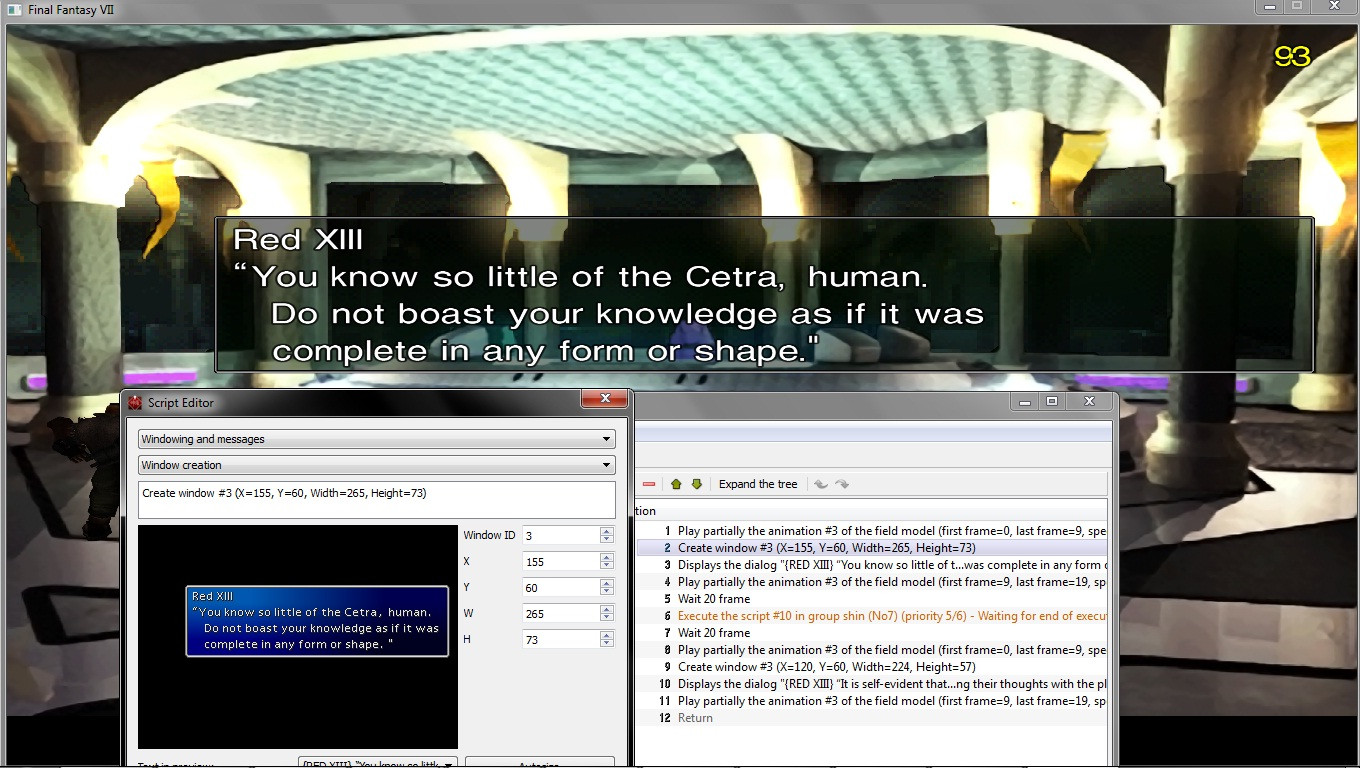
the auto-sizing is quite off
I suspect that is due to MR auto-sizing it for non-menu overhaul field and me actually using menu overhaul
so the text boxes are all too huge
sample
mw8fg.jpg
 
edit 3: New bug
when you add a new music via ctrl+q menu, it no longer saves the folder it last checked for the to-be-imported akao file. in 1.5 it remembered the last folder it was in
OK

the auto-sizing is quite off
I suspect that is due to MR auto-sizing it for non-menu overhaul field and me actually using menu overhaul
so the text boxes are all too huge
sample
[nice snap]
Same parameters, different result:
1349182510-window-test.png
 
It is as I suspected.

The font is different, so you're not using Menu overhaul
Menu Overhaul apparently makes the font smaller and less spacious

This is purely speculation but I assume you have some function based on font that calculates how big the window needs to be
If you make an option in the option menu ( Menu Overhaul, yes / no ) and activating that switches the function to a different one ( essentially the same but with the Menu Overhaul font ) then both people who don't use it and people who use MO can get the right size boxes.
 
Menu overhaul has a smaller font and changes certain other values like "MAX" tag in script (this is used to space characters equally like prize menu at gold saucer).

Most problems would be solved by reading window.bin table which is really all the font spacing data is.  Of course you'd also need to use my font as well in the preview screen (scale your own font is prob better idea).  I am not sure how much smaller my font is in terms of size. 

Luksy has done work with ts to make the boxes resize to menu overhaul font, but has not yet tackled the GUI version of ts.
 
If you have a lot of text, it's SUBSTANTIALLY smaller.
Just look at how extreme it is in the screens
the box is like 20% bigger than it appears in MR
 
Status
Not open for further replies.
Back
Top
