[PSX/PC] General editor - Hades Workshop (0.50b)

  • Thread starter Thread starter Tirlititi
  • Start date Start date
Status
Not open for further replies.
Kefka, it sounds like you might be interested in the Poison and Regen tables I have on the Statuses sheet of my mod's spreadsheet. They show how many hits and what % of HP each status moves at each value of Spirit.

 
Thanks, Vir, your tables give a nice overview of how the spirit stat influences the time span and the amount of damage/healing that comes from regen and poison. Now all I would need to know is how to edit that. As for now, the only way to lower Regen healing is by lowering the Spirit stat, but I don't wanna do that, as Spirit is important for so many other things as well.

By the way, your tables also gave me some nice ideas for my own mod.
 
@Tirlititi I have 2 question:

1º: Could be possible disable randon battle over the field and World map? if yes, how i do this?

2º: will be possible allow extract insert video (*.str) in the future?

EDIT:

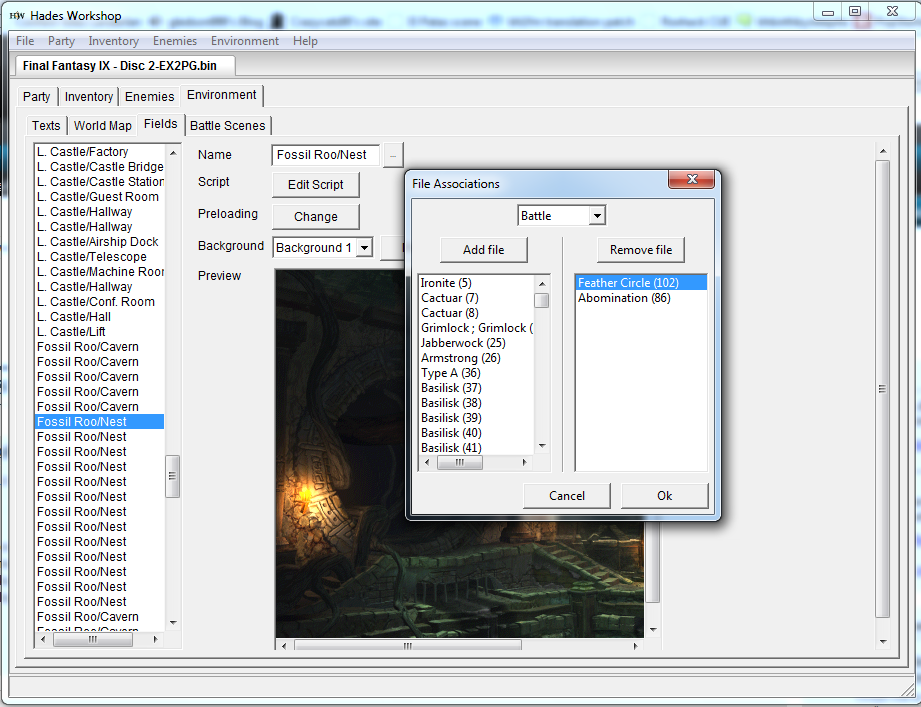
1º: I found the Preload option on Environment tab/Field and i removed this monster.
oB8eOmm.png


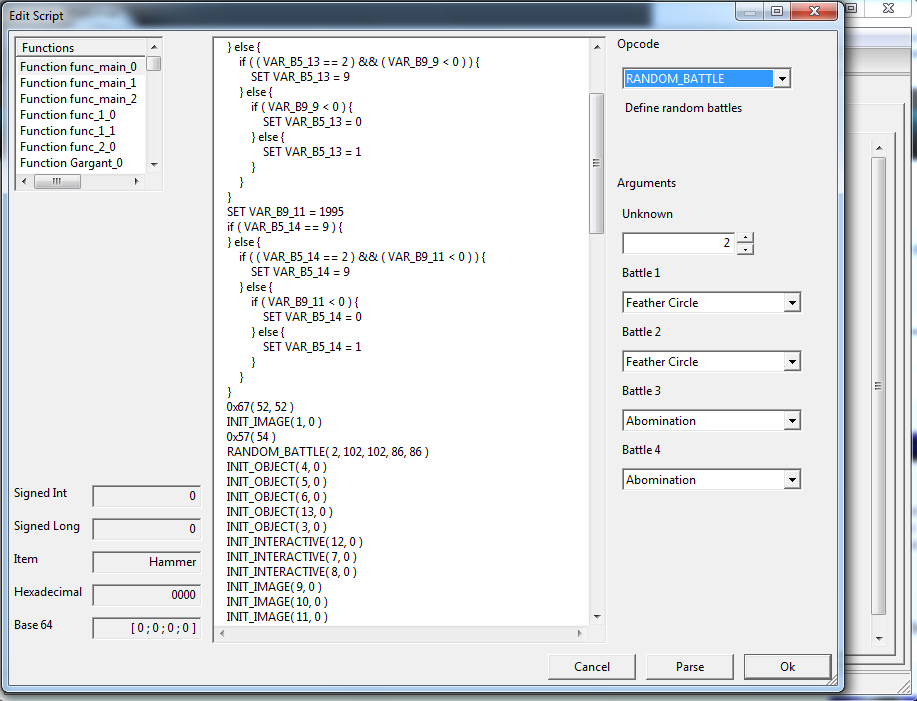
2º: I changed script and changed the Opcode RANDOM_BATTLE to NOTHING parsed and saved
v0Cxy9e.png


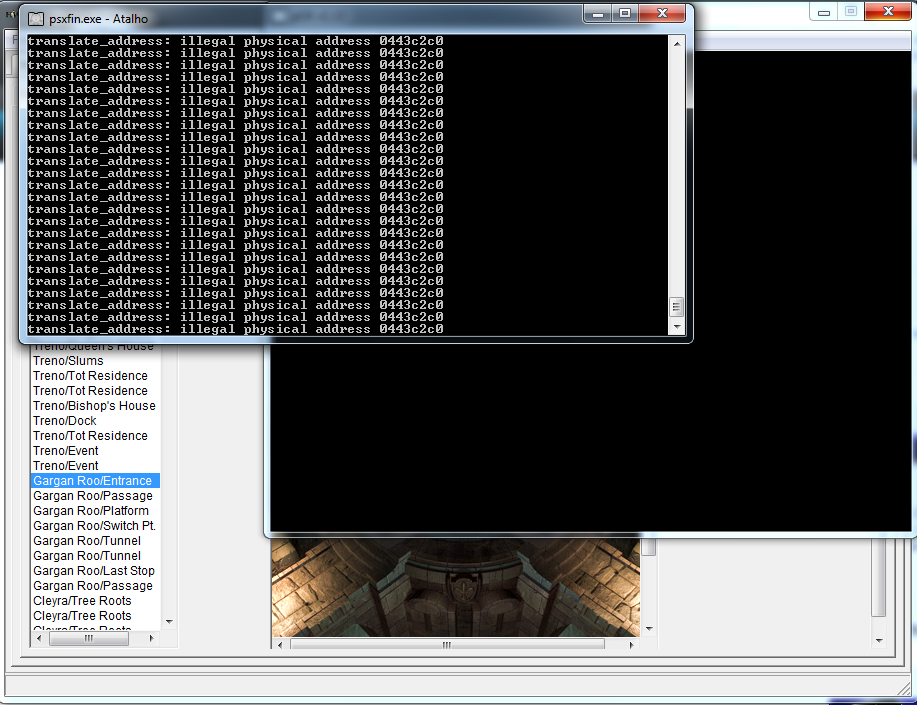
3º: but when i enter in game scenario the game crashes like this
i8tTrx9.png
 
Last edited:
Hey ! I'm sorry, I'm having some problems with my computers so I can't check or test things right now.

@ Kefka : that's a pitty for the counters :/
I would have thought it should work at least in the looping function. Did you check if it was actually looping? The function should end with those two lines :
Code: [Select]
Code:
    WAIT(1)    loop
If there is a RETURN instead, it won't loop anyway so it may be why it didn't work.
About the statuses : no, I don't plan to go that far in the battle mechanics. I wish I could, but the figures controlling these kind of things are really spread over the file and it will be too difficult for me to draw the big picture of the battle mechanics.
However, I've progressed in the spell animation editing feature ; without giving false hope (this feature was full of them for my concern), there might be a way to stop the ATB progression during spell animations, making the combo regen+booster lighter. That also needs checks.

@ gledson : I would have advise you to do exactly what you did....
There is no need to remove the battles from the preloading list, though, and it is the thing that most likely made the bug.
In order to take no risk : simply remove the line RANDOM_BATTLE (remove it, don't change it to "NOTHING" though if that was the problem, then I made a terrible mistake ^^"), parse and save and that should be all about it.
Save states should work fine for a script edition like this. The changes will be effective as soon as you (re)enter the field. However, when changing the preloading files, I think the field needs not to have been preloaded first, so the save state must be at least 2 fields away from the modified field (for the entrance of the Gargan Roo, the save state should be in Tot's tower stairs, for example).

Also, keep in mind that there may be the "RANDOM_BATTLE" opcode somewhere else than in the main function. For instance, the random battles of the fire room in the Desert Palace are activated only once all the fires have been lightened up. So there is a conditionnal execution of "RANDOM_BATTLE" in the main function but there is also another one in another function running when the last fire is lightened.
 
@ gledson : I would have advise you to do exactly what you did....
There is no need to remove the battles from the preloading list, though, and it is the thing that most likely made the bug.
In order to take no risk : simply remove the line RANDOM_BATTLE (remove it, don't change it to "NOTHING" though if that was the problem, then I made a terrible mistake ^^"), parse and save and that should be all about it.
Save states should work fine for a script edition like this. The changes will be effective as soon as you (re)enter the field. However, when changing the preloading files, I think the field needs not to have been preloaded first, so the save state must be at least 2 fields away from the modified field (for the entrance of the Gargan Roo, the save state should be in Tot's tower stairs, for example).

Also, keep in mind that there may be the "RANDOM_BATTLE" opcode somewhere else than in the main function. For instance, the random battles of the fire room in the Desert Palace are activated only once all the fires have been lightened up. So there is a conditionnal execution of "RANDOM_BATTLE" in the main function but there is also another one in another function running when the last fire is lightened.
Thanks Tirlititiworked perfectly on field battle :D

other questions, I could not find where the value disables battles on the world map ?, as it does to disable because I did not find any opcode called Random Battle, is to remove battles for some monsters.

Ex: no battle will be read with Armstrong data Desert, only be read data Adamantoise

It's Possible?


OBS: I'm trying to make a patch to perfect Excalibur guide ;)
 
@ Kefka : that's a pitty for the counters :/
I would have thought it should work at least in the looping function. Did you check if it was actually looping? The function should end with those two lines :
Code: [Select]
Code:
    WAIT(1)    loop
If there is a RETURN instead, it won't loop anyway so it may be why it didn't work.
Ah, that could be why it wasn't working, I was always using RETURN at the end. I'm gonna try again with a loop function then.

About the statuses : no, I don't plan to go that far in the battle mechanics. I wish I could, but the figures controlling these kind of things are really spread over the file and it will be too difficult for me to draw the big picture of the battle mechanics.
However, I've progressed in the spell animation editing feature ; without giving false hope (this feature was full of them for my concern), there might be a way to stop the ATB progression during spell animations, making the combo regen+booster lighter. That also needs checks.
Interesting, that might be a solution to both of my status-related questions. It would make Auto-Regen far weaker while at the same time prolonging the duration of all status effects. If that is indeed possible it would be great.

Another question regarding the random battles: If it is possible to remove random battles from a certain field, the opposite should be possible, too, right? Because I was considering adding random battles to fields that currently have none. So all I would need to do would be to add the RANDOM_ENCOUNTER function to a field file, plus the four random battles that I want in brackets, like this:

Code: [Select]
Code:
RANDOM_BATTLE( 0, 306, 306, 310, 310 )
Or is there something else that needs to be done?
 
@ gledson : Yeah, the random battles are not handled by the script in the world map (except for Ragtime mouses and Antlion, IIRC). You can't remove the battles from the world map for now :/

@ Kefka : You got it right, but you also need to add the battles in the preloading datas. There is a bug that should be corrected in the next version for preloading datas, but you can try now nonetheless.
Add those battles to the preloading datas, add the "RANDOM_BATTLE" opcode inside the script and test : it will crash in-game if the bug occured and should work fine if not ^^
The corresponding battle scene for the battles must be preloaded as well but I think I made it automatic (if you add a battle, the battle scene is added too if it weren't there).

Note that the 1st argument of "RANDOM_BATTLE" has unknown effect. It might be about the frequency of random encounters.
 
@ Kefka : You got it right, but you also need to add the battles in the preloading datas. There is a bug that should be corrected in the next version for preloading datas, but you can try now nonetheless.
Add those battles to the preloading datas, add the "RANDOM_BATTLE" opcode inside the script and test : it will crash in-game if the bug occured and should work fine if not ^^
The corresponding battle scene for the battles must be preloaded as well but I think I made it automatic (if you add a battle, the battle scene is added too if it weren't there).

Note that the 1st argument of "RANDOM_BATTLE" has unknown effect. It might be about the frequency of random encounters.
Ah, ok, thanks for the tip. I'll play around with that for a while.

I've got another question for you, and maybe it can already be done in the current version, but I'm not quite sure how. Is it possible to change the contents of treasure chests on the World Map? I already know how to do it in the Field files, but I'm not sure about the World Map. There is a section called Chocobo Treasures in the World Map tab, but the ITEM ADD Opcode in its script contains only variables, not absolute item IDs like in the field files. Where exactly are the items in the chocobo treasures located?

The reason I’m asking is because I'm mainly working on rebalancing the game's difficulty (not an extreme hardcore mod, just a bit more challenging than normal) because I find that it’s way too easy. Rebalancing the first two discs was easy, but early disc 3 is where the problems start. This is the point when you can find some of the game's most powerful equipment way too early, like Dragon's Hair, Ragnarok, Kaiser Knuckles, High Mage Staff, Light Robe, Shadow Robe, Circlet and Genji Armor. So I was planning on swapping some of these items to later treasure chests, when their stats are more appropriate for the point in the game.
 
According to my memories :
The variables that set the items for the Chocobo chests are located in one of the "chest" function. There is a switch with several variable settings.
The first "SET" is about marking the treasure as found,
the second "SET" is about the first item given,
the third "SET" is about the amount of that item,
the fourth "SET" is about the second item given,
etc... for 4 items
Note that a special variable is used for smoke-evolving chocographs. Also, the script is written so only the 4th item can be a card (but I think you can also give a regular item in the 4th slot).

To see the corresponding item when in the "SET" lines, you need to go to the "Inventory" panel before editing the script. Then the corresponding item will be displayed when you select a number. You need to be quiet familiar with the item sorting by ID if you want to modify it, though :/
Alternatively, you can also write a dummy line "ITEM_ADD" only to have the menu on the right that automatically puts the corresponding number. You remove that line once you're done.
 
Finally update to 0.28 after some break.

I didn't do what I initially planned... That happens too often ^^"
- You can now edit the animation sequencing for both spells and enemy attacks,
- Fixed script bugs and made it a bit more comfortable to read,
- Improved the UI some bit (images no longer twinkles, for instance),


The good news : editing the enemy animation sequencing allows to choose which spell they can cast (SFX-speaking). You can also add several damage points in a spell animation so the spell effect is activated several time (you can use it for making an enemy double-casting or dealing more than 9999 in one attack, for instance).
Enemy animation sequencing and spell animation sequencing are alike, but not totally the same. There are a lot of opcodes related that are unknown. The ones the game doesn't use at all are called "Unused XXXX" but some of them actually do have an effect.

The bad news is that I didn't find a spell animation opcode that halts the ATB, as I wished. I think the chances such an opcode exist are thin.
There is also much less control in spell animation sequencing that I thought. The "Play model" opcodes are kinda bad named because it doesn't only display the spell model but also has some control over the sequencing (Death lvl 5's "Play model" defines the damage point and Ultima's last "Play model" is the thing that loops forever and freeze the battle).

About the script's improvement, you have more translations available in the left of the screen (if an integer corresponds to an attack list, a spell ID or a button list, you can read it conveniently) and the battle properties are also displayed better.

As always, I also found the use of some more script opcodes... But the animation sequencing ones have been added so I'm not near to see the end ^^"
 
Great work, man! Thanks for the update! It's even working for me, don't know why I had problems and crashes with version 0.27, but 0.28 is running flawlessly again.

Anyway, I've got two questions regarding monster formations that I hope you can shed some light into:

1.) I've noticed that in some monster formations, there are additional slots checked as Targetable even when they don't contain an enemy (see pic). Do you know why this is the case or whether it serves a purpose?

hte9gn.jpg


2.) I've tried adding additional monsters to some battle formations (I also did check the Targetable flag in the new slots that were filled). For example, I wanted to add 2 Goblins to a fight that normally only has 2 Fangs. But then in battle something wierd happens: the new monsters are only visible for a couple seconds,  then they disappear. I suppose it happens when their turn comes up, because the new enemies also cannot perform any attacks. The funny thing is that they still remain targetable, but they're just invisible and cannot act. Any ideas about what's going on?
 
1) The "targetable" flag isn't actually used by the vanilla game, but disabling it can be used to make things like the Bomb-Steiner battle. The vanilla game must be doing that using the script to do that.

2) For adding more enemies, you need to go to the script too and add "INIT_OBJECT" lines to the main function. The first argument of this opcode is the related AI and the second may be related to the enemy slot in the "Groups" section (just check how it is coded in other battles and you'll understand ^^).
Be aware that, for bosses, adding more enemies can be handled weirdly by the script : the battle is usually automatically won when the boss reach 10000 HP, for instance.
 
Ah, thanks a lot, it's working now! Don't worry, I don't plan on messing with boss formations, just wanted to add more enemies in random battles. I find it kinda lame that in most battles there's only 1-2 enemies, and the maximum of 4 is hardly ever used.
 
I find it kinda lame that in most battles there's only 1-2 enemies, and the maximum of 4 is hardly ever used.
That's certainly due to the limited PlayStation VRAM space for enemy textures during battle.
Remember there's already a fixed space for the stage's textures and up to four characters and character
weapons texture space, and a certain amount of space must be free for attacks/magic/summons textures too.

There could be a problem if you put more than 3 different enemies in the same battle depending on their specific texture data.
I guess they put thought on balance for texture data for each enemy formation.

the battle is usually automatically won when the boss reach 10000 HP, for instance.
What do you mean by that? Is it maybe that healing an enemy for above 65535 (HP overflow) automatically kills it or something?
 
Last edited:
Most bosses don't die by their HP being reduced to 0. Instead, if HP < 10000 trigger death script. This is why Ozma has 55535 HP -- he actually has 65535 but he dies when going below 10000 so he effectively only has 55535. You can't scan so you wouldn't know either way. If the boss's HP did reach 0 the battle just wouldn't end/would hang, which isn't a problem since bosses are immune to instant death attacks and other damage doesn't exceed 9999.
 
Most bosses don't die by their HP being reduced to 0. Instead, if HP < 10000 trigger death script. This is why Ozma has 55535 HP -- he actually has 65535 but he dies when going below 10000 so he effectively only has 55535. You can't scan so you wouldn't know either way. If the boss's HP did reach 0 the battle just wouldn't end/would hang, which isn't a problem since bosses are immune to instant death attacks and other damage doesn't exceed 9999.
WTF?! That's so bizarre... :-o
Any idea on why they did that? :?
 
Most bosses don't die by their HP being reduced to 0. Instead, if HP < 10000 trigger death script. This is why Ozma has 55535 HP -- he actually has 65535 but he dies when going below 10000 so he effectively only has 55535. You can't scan so you wouldn't know either way. If the boss's HP did reach 0 the battle just wouldn't end/would hang, which isn't a problem since bosses are immune to instant death attacks and other damage doesn't exceed 9999.
WTF?! That's so bizarre... :-o
Any idea on why they did that? :?
The "death if HP drops below 10000"  script is used by all enemies that have a special death animation, be it a spectacular explosion or just talking to you (Baku, Lani, Kuja, for example). The funny thing is, for all bosses that have less than 20000 HP total you can actually verify that in game by throwing a tent at them (which heals exactly 50% of HP and MP in battle). For example, the Masked Man from the game's beginning has acutally 10188 HP, and when you throw a tent at him it heals him for 5094, that's how you know it.

The only enemy in the game that has a "true" final attack is Maliris with her Raining Swords. This is the only attack that is performed when the bosses HP reach indeed 0, so we know that true final attacks must be possible.

I have no idea why they did that, but it's been bugging me too for a while now. I've always wondered if it might be possible to make these special boss deaths behave like Maliris (change them from "perform special death if HP is less than 10000" to "perform special death if HP is 0"). This would allow us to give most disc 4 bosses an additional 10000 HP. But so far I've been unsuccessful with that.
 
^this

That's really strange indeed. I didn't even see Maliris's final attack code. I thought it was also using the "under 10000 HP" way.
So they indeed made 2 different systems for handling the end of the boss battles...

You can't use the "perform special death if HP is 0" system with HW for now. I'll look into it but if that works as I think it does, it shouldn't be too hard to enable.

However, you can already give more HP to enemies using the script : when an enemy goes under 10 000 HP, heal him.
See this post for a detailled way to go : https://www.ff7catalog.com/posts/174058/
 
This is an awesome update, and that information about Boss HP going under 0 is really interesting too, so that means boss battles have a different ending script to the normal random battles, interesting.

Are there any plans to add Gif support, lots of the backgrounds have nice animations going on and its not really possible to show the animations right now without exporting each frame individually and stitching them together in photoshop. A better method could be layered Tifs, with each frame being its own layer within the tif. I'm not sure how difficult that might be though.
 
I thought about making it GIF exporting instead of TIFF exporting, but that wouldn't work because there is not only 1 animation per scene but several independant ones. Or there is a GIF feature I'm not aware of?

Personally, when I want to get a GIF from the scene, I use either one of the 2 solutions :
1) using a program, Screen2Gif and capturing the animation(s) in the editor,
2) check all the tile blocks in the editor, then export, then open the TIFF with GIMP, then "Copy visible" -> "Paste" in a new image for each frame of the animation.

The second solution is cleaner but a little more tedious. I find it less tedious than exporting each frame from the editor though.
I'm not aware of photoshop's subtilities but I guess it would work pretty much the same with it.

I hope I helped.
 
Status
Not open for further replies.
Back
Top