[PSX/PC] General editor - Hades Workshop (0.50b)

  • Thread starter Thread starter Tirlititi
  • Start date Start date
Status
Not open for further replies.
Guys, again, I solved! Sorry for all the posts... but the script was too long. Please feel free to remove the other parts of the script, if you wish!

 
Little problem, not so big..maybe you can help me, so in The Temple of Water I found a little problem. So.... I have a code like this for the Party Reserve

Code: [Select]
Code:
                 CureStatus( 0, 127 )                CureStatus( 1, 127 )                CureStatus( 3, 127 )                CureStatus( 2, 127 )                CureStatus( 4, 127 )                CureStatus( 5, 127 )                CureStatus( 7, 127 )                CureStatus( 6, 127 )                CureStatus( 8, 127 )                break            }        }        if ( 0 ) {            set Setting_OptionalQuina = 0        }        set Setting_PartyReserve = 1083        SetPartyReserve( Setting_PartyReserve )        if ( ( ( Setting_PartyInitialized >> 0 ) & 1 ) == 0 ) {            SetCharacterData( 0, 1, 255, 9, 0 )            set Setting_PartyInitialized |= 1        }        if ( ( ( Setting_PartyInitialized >> 1 ) & 1 ) == 0 ) {            SetCharacterData( 1, 1, 255, 5, 1 )            set Setting_PartyInitialized |= 2        }        if ( ( ( Setting_PartyInitialized >> 2 ) & 1 ) == 0 ) {            SetCharacterData( 2, 1, 255, 6, 2 )            set Setting_PartyInitialized |= 4        }        if ( ( ( Setting_PartyInitialized >> 3 ) & 1 ) == 0 ) {            SetCharacterData( 3, 1, 255, 5, 3 )            set Setting_PartyInitialized |= 8        }        if ( ( ( Setting_PartyInitialized >> 4 ) & 1 ) == 0 ) {            SetCharacterData( 4, 1, 255, 6, 4 )            set Setting_PartyInitialized |= 16        }        if ( ( ( Setting_PartyInitialized >> 5 ) & 1 ) == 0 ) {            SetCharacterData( 5, 1, 255, 5, 5 )            set Setting_PartyInitialized |= 32               }        if ( ( ( Setting_PartyInitialized >> 6 ) & 1 ) == 0 ) {            SetCharacterData( 6, 1, 255, 6, 6 )            set Setting_PartyInitialized |= 64        }        if ( ( ( Setting_PartyInitialized >> 7 ) & 1 ) == 0 ) {            SetCharacterData( 7, 0, 255, 5, 7 )            set Setting_PartyInitialized |= 128        }        SetName( 11, 30 )        SetCharacterData( 11, 1, 10, 21, 12 )        SetPartyReserve( 1083 )        set Setting_OptionalQuina = 1        set Setting_DaggerDepresses = 0        set Setting_MPx4 = 0        if ( 1 ) {            Party( 4, 1 )            UpdatePartyUI(  )        } else {            Party( 0, 1 )            UpdatePartyUI(  )        }        if ( IsInParty(5) ) {            set Setting_OptionalQuina = 1        }
You know why Eiko persist to be in the team?
I'm trying to find a solution by myself, but if somebody of you can help me before I'll be so glad ;D
 
With this code, you should be able to choose the party members yourself. You mean that she's still available in the menu while she shouldn't?
In that case, it's most likely because she's already in the party at that point and you need to remove her before the "Party" call:
Code: [Select]
Code:
if (IsInParty(6)) {    RemoveParty(6)}
 
Thank you for the reply, but unfortunately nothing happens.. I've also tried to uncheck the other numbers in "SetPartyReserve" to see where is the problem and, the problem still be that everyone should be removed.. except Eiko? It's kinda strange  ???

UPDATE: Ok, I guess I found the problem..!! :)
 
Last edited:
@Trilititi i set a supporting spell in order to immediately switch to trance mode , and i need to know how to make sure that trance mode have an infinite duration, so , what part of the CIL i have to modify in order to have unlimited trance mode ? for now the only thing that i can imagine is that the limitation of trance mode may be based on the turns ( like : one turn , and the time for trance mode decrease ) , or maybe the time restriction is based on the commands you use ( like: you use "attack" , and something in the game tell that the attack command , or whatever command, must subtract a little of the trance bar ) , and once we find the solution for this , i need help to modify a supporting spell in order to use it to switch between trance mode and normal mode , even in this case , the only thing i can imagine is that is necessary to modify something in the CIL code section
 
So, yes, it is about CIL code, but editing the CIL code through HW is very tedious and limited.
It's better to edit the C# code using the tool dnSpy.

In any case, the trance gauge goes down in the method "btl_cmd::FinishCommand" (the class is "btl_cmd" and the method is "FinishCommand").
You have this block in this method:
Code: [Select]
Code:
if (Status.checkCurStat(regist, 16384u) && cur_cmd.cmd_no != 3 && cur_cmd.cmd_no != 12) // The status "16384" is trance ; The commands 3 and 12 are "Jump"{ byte b = (byte)((300 - (int)regist.level) / (int)regist.elem.wpr * 10); // That's the amount by which the trance is depleted if (cur_cmd.cmd_no == 21 || cur_cmd.cmd_no == 23) {  b /= 2; // For Double-Casts, it's halfed } if (FF9StateSystem.Settings.IsTranceFull) {  b = 0; // Cheat mode } if (regist.trance > b) {  BTL_DATA expr_1B0 = regist;  expr_1B0.trance -= b; } else if (!FF9StateSystem.Battle.isDebug) {  btl_stat.RemoveStatus(regist, 16384u); } if (cur_cmd.cmd_no == 18 && btlsys.phantom_no != 0) // This registers the command for Dagger's Eidolon: it will recast the spell afterwards {  btlsys.cmd_status |= 4;  btlsys.phantom_cnt = btl_cmd.setPhantomCount(regist); }}
I didn't really understand what you wanted to do, but there's a high probability that it's there.
 
@Trilititi don't worry i will explain better , the objectives are : have one spell that allow to switch to trance and normal mode , and make sure that trance mode have an infinite duration , now , i already  a support spell that allow me to switch to trance mode , but i still have to modify that spell so it can reverse immediately to normal mode  , and still i have to give and infinite duration to  trance mode , in this way , we will be able to enjoy the trance mode without anything that can piss us of , about the method you suggested to mod this function , i am not an hacker so is better if i use hades workshop , it may be limited , but still is surely more user friendly than any other program , in any case , i am sure that the problem is my bad english that didn't allowed you to understand me lol , infact , you yourself created the marco mod in hades workshop that allow to disable the cheats , and one of those cheats are used to have an infinite trance bar :D , but i really don't understand anything of the piece of cil code that you showed me , can you explain me what i must write in order to obtain unlimited trance meter ?
 
Last edited:
i really need those explanations, that suggestion isn't enough for a non-hacker ahah
 
@Tirlititi

Still no options to resize the UI menu for battles without using Memoria?

UPDATE:

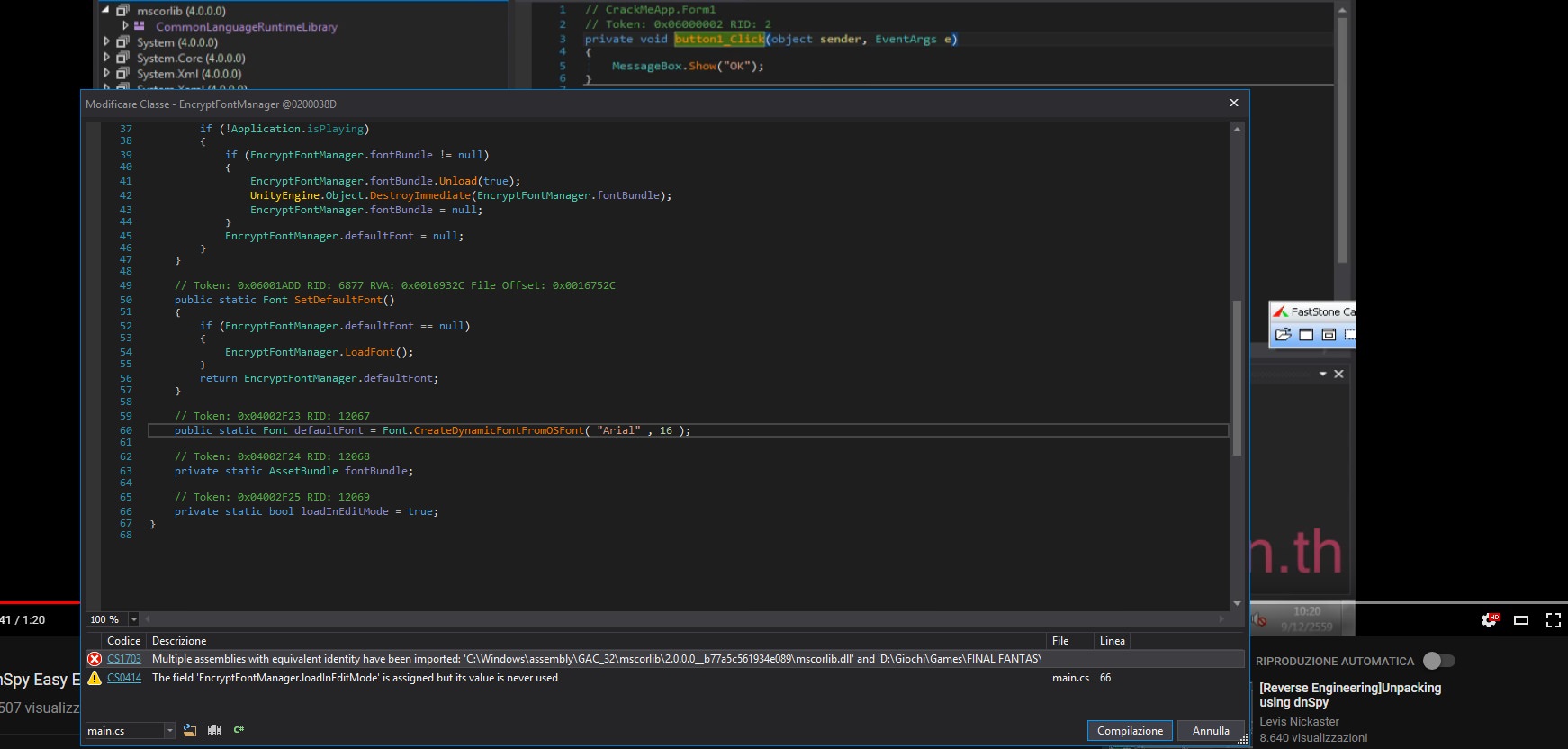
I also tried to change font with DnSpy... but it gives me the following error, may I did something wrong?

0tLMM2n.jpg


Last UPDATE:

Is there a way to cut the tutorial before the very first battle and the "Warning security" stuff before the Squaresoft logo? And where can I find the Texture2D of the Launcher?
 
Last edited:
Still no options to resize the UI menu for battles without using Memoria?
Wasn’t till now:
Here

for your case, use this as your Csharp base.

I also tried to change font with DnSpy... but it gives me the following error, may I did something wrong?

https://i.imgur.com/0tLMM2n.jpg[/

Last UPDATE:

Is there a way to cut the tutorial before the very first battle and the "Warning security" stuff before the Squaresoft logo? And where can I find the Texture2D of the Launcher?
[/quote]
I used to get that error a lot. Delete that [i]mscorlib.dll[/i] (right panel) and recompile.

There isn’t a texture for the Launcher in any of the archives. That requires a different approach to change. Fact is, you can actually use the launcher from Memoria change the image launcher and use that compatible throughout. I use the launcher from Memoria to change the image. Changing the launcher image in Memoria wont affect your CSharp either.
 
Last edited:
I used to get that error a lot. Delete that mscorlib.dll (right panel) and recompile.

There isn’t a texture for the Launcher in any of the archives. That requires a different approach to change. Fact is, you can actually use the launcher from Memoria change the image launcher and use that compatible throughout. I use the launcher from Memoria to change the image. Changing the launcher image in Memoria wont affect your CSharp either.
Omg, thank you dude! Everything is perfect! ;D

Wasn’t till now:
Here

for your case, use this as your Csharp base.
Thank you, but I was thinking about something more like the PS1 version, something like this https://steamcommunity.com/groups/ff-modding/discussions/13/1290690926876650747/
The problem is that I don't know it I can apply it without mess everything (plus there's the problem about the link you sent me that if I copy and paste the AssemblyCSharp I will replace mine with all the work I made , right? )
 
Last edited:
Omg, thank you dude! Everything is perfect! ;D

Thank you, but I was thinking about something more like the PS1 version, something like this https://steamcommunity.com/groups/ff-modding/discussions/13/1290690926876650747/
The problem is that I don't know it I can apply it without mess everything (plus there's the problem about the link you sent me that if I copy and paste the AssemblyCSharp I will replace mine with all the work I made , right? )
Nope, not that one linked it be screwed.
05556800-4_FD8-4_A29-_A0_FE-4_A5_E5_F282962.gif


2 things.
1. Use this CSharp as a base, and reapply your .hws mod.

2. Inspect CSharp from archive in dnapy, grab the code and apply to your already outputted hws mod. CSharp.
If all fails, rough it.
F98_E4891-553_C-4_BE7-9_F21-6_BB28_F05_DB98.gif
 
@ToraCarol: I'm still not doing anything with the UI but I'll come to it soon. I also want to give the possibility to get something similar to the PSX UI.

@Brucy: Ok, so the most simple is to use the "trance" effect like you do but tweak it a little to make it un-trance if the trance is already on.
In any case, using dnSpy is the best way to edit "CIL Code". Also, since you need to change the method "btl_calc::CalcMain", it is impossible to do with HW anyway.
1) Install and open dnSpy,
2) Close the mscorlib, System and System.Core to avoid the same problem as ToraCarol,
3) Open FF9's "Assembly-CSharp.dll" with dnSpy: you can now browse in the source code of the game and search for a specific class,
4) Search for the class "btl_cmd" (it is in the root folder, marked by {} - ),
5) Scroll down to the method "FinishCommand", right-click on it and "Edit the C# method",
6) Replace the line "if (FF9StateSystem.Settings.IsTranceFull)" by "if (true)" and compile: with this, the trance will not decrease,
7) Now search for the class "btl_calc" and its method "CalcMain" and "Edit the C# method" as before,
8‌) You should see a lot of "case" lines, scroll down to the "case 96" ; it should look like this by default:
Code: [Select]
Code:
 case 96:  target.trance = byte.MaxValue;  btl_stat.AlterStatus(target, 16384u);  break;
9) Replace that case by this:
Code: [Select]
Code:
 case 96:  if (Status.checkCurStat(target, 16384u)) {   target.trance = 0;   btl_stat.RemoveStatus(target, 16384u);  } else {   target.trance = byte.MaxValue;   btl_stat.AlterStatus(target, 16384u);  }  break;
11) Compile. Apparently, dnSpy whines about implicit type-casting... So it will be a bit tedious, but for all the errors you get (double-click to go to the related line), add a type cast like this for example:
Code: [Select]
Code:
Default: target.elem.str = target.elem.str * 3 / 4;Replace with: target.elem.str = (byte)(target.elem.str * 3 / 4);
I've put "byte" in the parenthesis for this one because the error says "Cannot convert to 'byte'". You need to write "short" instead when the error is about converting to short. After each line replaced, you can press "Compile" to verify that the error line disappears.
12) "File -> Save the module" and you're done!

This is not what I would call easy, but that's how it has to be done ^^'
Good luck.
 
Last edited:
Guys, you know why everytime now I try to replace the AssemblyCSharp the game won't start after the Intro-Logo? Which can be the problem?  :'(
 
How do you mod it? Is it HW that gives you a bugged CSharp? If so, did you mod the CSharp beforehand with dnSpy?
 
I'm sorry to sound like a noob but I'm getting this error message

Configuration file not found for this binary file.
The program will perform a scan in order to open it

I want to extract and view. perhaps modify the field scenes.
 
Update to v0.40b.
- Fixed a couple of bugs:
-- Multi-lang links were not saved properly (when the ID of a dialog line in one language is not the same as the one in another language that is linked to the 1st),
-- Fixed a apparently rare bug with .hws files that could occur when editing some script functions (when a .hws file is affected, it crashes on import).
-- Script batching sometimes exported more languages than what was asked in the Preferences,
- Added a couple of datas:
-- For enemies, there is a flag that enables the use of a "Death" function in the AI. When this flag is disabled, that function is ignored. It was not possible to change this flag previously.
-- For spells, items and enemies, added a few "dummied" datas, that are not used at all by the game but that can get some use if you mod the engine (for instance, to increase the experience given by an enemy or, a bit more difficult, increase an enemy's max HP).
 
Status
Not open for further replies.
Back
Top