[PSX/PC] Save editor - Hyne (1.11.2)

  • Thread starter Thread starter myst6re
  • Start date Start date
Status
Not open for further replies.
wondering is there a way to change character uniforms? , there is a 'alternate model' tick box in the character section but it didn't do anything , am i missing something? or not possible?

 
Hello

Any news about this todo ?
- Position editor (worldmap)

this option is very usefull but i cant get it, how find possition X, Y etc...

thank you
 
Last edited:
Hello, I redet my pc and now it won't work at all. e location hasn't changed, and I even left it in the same spot as before bu it just won't load up. Task  Manager shows that's running but it won't do anything, waiting does nothing. Having the game off does nothing. It used to work before the pc reset but now it doesn't. Please help
 
1328372584-hyne.png

Hyne 1.10.0 - FF8.fr Edition
Download here

Changelog :

  • Fixing slot detection on modern Windows (2000 version)
  • Adding uncompressed save format
  • Fixing GF forget ability
  • Adding Queen trade rule, CC quest and BGU TT victory count
  • Adding worldmap position presets
 
1328372584-hyne.png

Hyne 1.11.0 - Compatibility Edition
Download here

Changelog :

  • Adding compatibility with Switch saves
  • Improve detection of PC 2013 and PC Remaster editions
  • Fixing format detection algorithm (for PC like saves)
  • Adding VMP (PSP) and PSV (PS3/PSVita) signatures
  • Adding the end of the CC quest
  • Fixing Chocobo World Icon saving
 
Minor update to fix some troubles with the previous release.

1328372584-hyne.png

Hyne 1.11.1 - Compatibility Edition²
Download here

Changelog :

  • Fixing Switch format opening for files with unknown size
  • Fixing drag & drop bug
  • Adding ability to export one save of the list to PS4, Switch or PS3 formats (not just PC format)
 
  • Adding ability to export one save of the list to PS4, Switch or PS3 formats (not just PC format)
How do you write to PS4 saves?

Also the source seams to be missing CryptographicHash.cpp and CryptographicHash.h files
 
Last edited:
How do you write to PS4 saves?
I assume it's a PC decompressed format (don't remember who said that to me). If there are headers or hashes, I have no example of that.

Also the source seams to be missing CryptographicHash.cpp and CryptographicHash.h files
Oooooops
 
I assume it's a PC decompressed format (don't remember who said that to me). If there are headers or hashes, I have no example of that.
The ps4 exports for ff7 are around 10MB of crypto blob . Inside I'm sure its just PC save(s). You might want to check this if you can for the ps4 version.

Thank you I had a patch for hyne but i was not able to test locally due to the missing file

Nice work on the PSV / VMP signing! (both hyne and bc will support this at their release version 1.10.0, how did we end up at the same version.)

Notes on your psv/ vmp  object:
 - IV is the same for both formats.
 - PSV support for type 2 (check for a 0x2C @ byte 0x38) is not needed FF8 saves can not find its way in to this format It is only for PS2 Saves exported from a PS3 Look for 0x14 in byte 0x38 to be sure you have the correct format when loading a save
 - The Signing algorithm is the same for both VMP and PSV formats only the key and the data sent to be signed is changed. (i use one function todo both signatures)
 - The Sha1 object added from dots-tb's work is not needed you can use QCryptographicHash to generated this hash instead (I'm using it to generate MD5 sums for the pc rerelease already so why include another object? ).
 - The AES object  can be stripped down a bit as we will never use some functions ( my aes.c)
 - For non FF8 PSV exports (if you support this) Some additional work is needed. You should write a size and preview size data (0x40 and 0x5C get the same data its 00 20 00 by default and is the block size * 0x2000) you can refer to my fix_psv_header function for how i am doing it.
 - PSV names matter ALOT they must match the internal name stored in the file (starting at 0x64) the name is done like this  Code: [Select]
Code:
QString name = ff7->region(s).mid(0, 12);name.append(QTextCodec::codecForName("Shift-JIS")->fromUnicode(ff7->region(s).mid(12)).toHex().toUpper());
 
Last edited:
Hey guys, not sure if people are still playing this game or not. I'm in my second playthrough of 8 right now and want to use the Hyne editor for some stat testing. It's giving me a metadata.xml error and I have no idea how to fix it. Does anyone else know what this is about and how to fix it? I'm playing on the remastered steam version if that makes a difference. Thanks bois
 
Hey guys, not sure if people are still playing this game or not. I'm in my second playthrough of 8 right now and want to use the Hyne editor for some stat testing. It's giving me a metadata.xml error and I have no idea how to fix it. Does anyone else know what this is about and how to fix it? I'm playing on the remastered steam version if that makes a difference. Thanks bois

Hi singabore,
fixed the issuse temporally by copying the "metadata.xml"
from --- FF8 Steam 2013 (path: C:\Users\(Username)\Documents\Square Enix\FINAL FANTASY VIII Steam\user_ID)
to  ---->  C:\Users\(Username)\Documents\My Games\FINAL FANTASY VIII Remastered\Steam\(ID)\game_data\user\saves.

So in short copy "metadata.xml" form old "FF8" to "FF8 Remastered". Then Saving of Edited SaveFiles is possible.
Hope that helped a little bit.

Cheers  ;)
 
Quick question, is there a way to edit the save file in case you missed the old key 1/2 and triggering the floors in the second Laguna dream and add those in so that later on the draw points and area on Lunatic Pandora are available?
 
Enable advanced mode, go to HexaEdit > Field and modify the value at the address 0x119. If you've done everything right, it should be 0xD7.

hyne-help-1.png


How I know that? I use Deling to know which variable is modified https://www.ff7catalog.com/threads/8732/
Here var537 is modified, which correspond to 537 - 256 = 281 = 0x119 in the Field tab in Hyne (var0 to var255 are in Misc tab).
 
Last edited:
Hi singabore,
fixed the issuse temporally by copying the "metadata.xml"
from --- FF8 Steam 2013 (path: C:\Users\(Username)\Documents\Square Enix\FINAL FANTASY VIII Steam\user_ID)
to  ---->  C:\Users\(Username)\Documents\My Games\FINAL FANTASY VIII Remastered\Steam\(ID)\game_data\user\saves.

So in short copy "metadata.xml" form old "FF8" to "FF8 Remastered". Then Saving of Edited SaveFiles is possible.
Hope that helped a little bit.

Cheers  ;)
I'm having the same problem, but unfortunately I've never owned the 2013 Steam Version and I don't have a metadata.xml file anywhere on my drives. It simply doesn't seem to exist with the remaster. Is there any way to fake one (simply naming an empty file metadata.xml doesn't do it) or any other way to save editet files without it or am I just SOL?
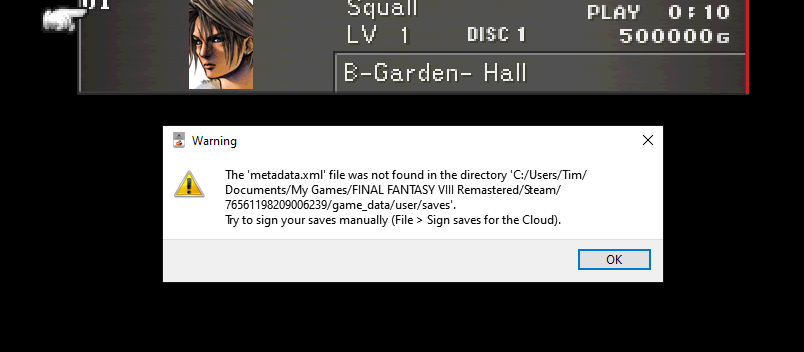
 
I'm having the same problem, but unfortunately I've never owned the 2013 Steam Version and I don't have a metadata.xml file anywhere on my drives. It simply doesn't seem to exist with the remaster. Is there any way to fake one (simply naming an empty file metadata.xml doesn't do it) or any other way to save editet files without it or am I just SOL?
8H9que3.png


Is this the error you're seeing? I get it as well, however any changes I make to the file are retained. I do not use any cloud functions though so that may or may not be a factor.

Just tested with Hyne 1.11.1 (was using 1.9.1). Same thing; Throws the "metadata.xml" error but seems to keep all the edited data.
 
Does this work with the xbox game pass PC version? or Windows store.
The issue i am having is actually finding the saves. im not sure if the XBGP version is packing them away somewhere or what, but i just cant find them.
I poked around with Process Monitor and didnt come up with anything useful.
 
Status
Not open for further replies.
Back
Top