[WIP] HD battle scene pack

  • Thread starter Thread starter BloodShot
  • Start date Start date
Status
Not open for further replies.
Did some more work on the Forest Scene used in Mideel/Around temple of the ancients

iyRc1cR9vvqM6.png
 
Indeed!
I wish we had more variations of one battle scene, so we could use the random feature of 7thHeaven. At last on the world map it would be nice.
 
You could use MC+FL, ALyza's, and these, but they're all pretty different styles so it would be weird.
 
I think it would really work well if the levels were very different. If they are basically the same with slightly different textures, I think you are right, it will just look odd. If they are redone to look like different locations, it will add variety (which is the point!).
 
No, they are just different retextures (well one's just an upscale) of the same scenes.
 
I really like the side by side shots you show.  It helps see how close you've been keeping them to the original.
 
Here's the next comparison of the lower sector 4 plate battle scene, in-game this time because in kimera not all the meshes show up

i3KEjlEF5SB0l.jpg


Anybody know the battle model file name for the yellow selector that floats above whichever character you're currently controlling?
 
Last edited:
Once again, great work.

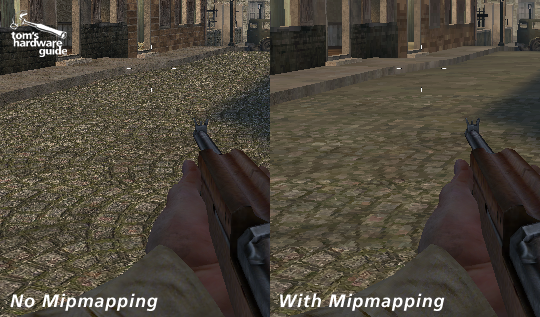
My chief concern is that detailed textures like this tend not to scale nicely in this engine. It's a non-issue in modern games with our fancy mipmaps and anisotropic filtering, but it can lead to an odd sort of sparkle, particularly if the textures have a lot of contrast:

kbHw5O0.png


That's not to speak ill of your work, it certainly looks fantastic. I just fear that it might not look as good in-game. Unless Aali has some secret future mipmap+aniso plans for a future version of his driver, this may be something to keep in mind.
 
Here's the next comparison of the lower sector 4 plate battle scene, in-game this time because in kimera not all the meshes show up

i3KEjlEF5SB0l.jpg


Anybody know the battle model file name for the yellow selector that floats above whichever character you're currently controlling?
As far as I can remember this is the exact same model as the pyramid enemies you can fight in debug.  So work out which one that is, I'm sure someone round here knows.
 
Thanks, I'll play around with each test pyramid and see which one shows up as the selection pyramid in-game.

Once again, great work.

My chief concern is that detailed textures like this tend not to scale nicely in this engine. It's a non-issue in modern games with our fancy mipmaps and anisotropic filtering, but it can lead to an odd sort of sparkle, particularly if the textures have a lot of contrast:

That's not to speak ill of your work, it certainly looks fantastic. I just fear that it might not look as good in-game. Unless Aali has some secret future mipmap+aniso plans for a future version of his driver, this may be something to keep in mind.
Yeah, I was concerned about that so I've been making the floor textures a max of 2048 but the walls and other distant textures smaller since you never see most of them up close anyway except the floor.

So far most of the textures I've tested seem ok, though certain ones like the wood floor I made for the Cathedral scene might have that issue, though I'm not sure yet since I don't have a save at that part.

Also, I probably won't do this for a while, but since the battle scenes are meshes would it be possible to remodel and texture them and import that into the game? Or even if you could add models onto the existing meshes, might be a good way of getting around the issue of low-poly/flat pipes in battle scenes and such.


EDIT:
I've replaced all of the test pyramids and none have resulted in replacing the select pyramid

Not really sure what to replace now. Could it be in the magic.lgp?
 
Last edited:
Don't worry, the backgrounds you and EQ2lysa made look damn good in-game. You've done a morphenominal job.
 
The density and shape of the metal flooring needs work. while it may be due to old low rez textures, the elevated grips in the original are more rectangular rather than with the tapered edges. also yours seems to have way higher density.
 
good work BloodShot!!
I hope you will complete the scenarios that have not been textured!
looks really nice your progress.
In the last image I think that the metal floor texture is not too much like the original but the improvement is very good.
Good luck!!!
:D
 
Ice cave

i9zmXFHZlLNWu.jpg


Don't mind the white background on the crystals, the transparency doesn't show up in kimera
 
Last edited:
Right side is the new spacing and shape

iblcPitlAAfOBp.jpg
To be honest, while the right looks more accurate to original game, the left looks more realistic to how it looks in everyday life.
 
Status
Not open for further replies.
Back
Top