[PSX/PC] Field Editor - Makou Reactor (2.1.0)

  • Thread starter Thread starter myst6re
  • Start date Start date
Status
Not open for further replies.
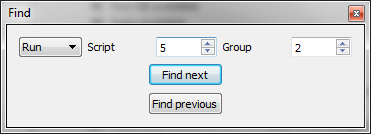
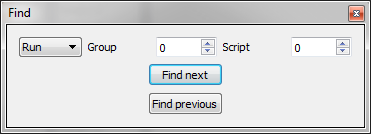
Many apologies, I only just realized you switched the group and switch fields around compared with 1.3
ziBIb.png


iuH9g.png


everything's fine.
 
Many apologies, I only just realized you switched the group and switch fields around compared with 1.3

(imgs)

everything's fine.
Ok, yes this had been requested. I don't know if it's better.
 
Hi there! I'd like to know if it's possible to use the tool to make a custom music play during a battle (I mean, not by editing using the Ficedula tool, because as far as I know it can only switch between music in a stock archive). I tried to skim through the various texts, and I found the battle I want to edit, but the only info regarding the battle music is something like "set music #1".
 
Last edited:
Hi there! I'd like to know if it's possible to use the tool to make a custom music play during a battle (I mean, not by editing using the Ficedula tool, because as far as I know it can only switch between music in a stock archive). I tried to skim through the various texts, and I found the battle I want to edit, but the only info regarding the battle music is something like "set music #1".
The management of music in the flevel is a twilight zone for me, I do not understand how it works. What I guess is that the opcode uses the AKAO #1 which must certainly contain the data for playing music ;).
 
Is there a way of pulling up the map files with a number lower than 65? I want to edit the scripts for events on the world map such as the battle triggers for Ruby Weapon etc.
 
Is there a way of pulling up the map files with a number lower than 65? I want to edit the scripts for events on the world map such as the battle triggers for Ruby Weapon etc.
Nope.
 
I will release a 1.4.1 version, that will enhance the "find" function.

Changelog:

  • Crash fix with "find previous"
  • Removing the information dialog when you search something
  • Text: adding search filters (case sensitivity and regexp)
  • Run: When you open the Find dialog, the group and the script are automatically filled with the current selected script
  • Run: Group is now a combobox filled with the names of group of the current field
 
Last edited:
I was attempting to use Makou Reactor to correct an error in some text in fship_1 for the Aeris revival patch install.  Unfortunately all I could do was look at the text, it would not allow me to actually edit the text when I had the specific text up in the editor window.

File list: '178 fship_1'
Group list: '13 ear    Aeris'
middle box: 'Script 20'
Action box: 17 Displays the dialog "{Aeris} "Let me think, {Cloud.}"" in the window #1


I was attempting to change it to {Cloud}.

It would not give me the ability to change the text in any way though.
 
Last edited:
I was attempting to use Makou Reactor to correct an error in some text in fship_1 for the Aeris revival patch install.  Unfortunately all I could do was look at the text, it would not allow me to actually edit the text when I had the specific text up in the editor window.

File list: '178 fship_1'
Group list: '13 ear    Aeris'
middle box: 'Script 20'
Action box: 17 Displays the dialog "{Aeris} "Let me think, {Cloud.}"" in the window #1


I was attempting to change it to {Cloud}.

It would not give me the ability to change the text in any way though.
Open "Tools > Texts..." menu, in this dialog you can modify your text.
 
UGerstl:

I'm not familiar with using touphscript yet.  This is all pretty new to me, but I'm slowly starting to grasp certain things. 

myst6re:

Thank you.
 
I'm running into an error with 1.41, it crashes quite often when trying to save/open. Even if I haven't done anything at all.
 
I'm running into an error with 1.41, it crashes quite often when trying to save/open. Even if I haven't done anything at all.
This is not normal, can you send me the file you're trying to open?
 
I want to congratulate for your incredible work with you "makou reactor", I can create new events in game, and add cutscenes!

In this link is example:

(cutscenes in minute 3)

When you think about upgrading makou?
You think add news specifications in "variable manager"?
Miscellaneous is in beta? I try add new gateway but crash alls :(


And small questions!

It's really possible add or show "gametime"in game?

The idea is mount or save in variable x "game time" for event
( example $BattleCount to the variable #X)

Add"game time" in Var[1][23] and add condition
Var[1][23] = Var[1][23] * 2
In field If  Var[1][23] = Var[1][23] * 2  add x-potion!

In this case active in 2 hours of game, in 4 hours apply event!
But I not understand what's variable need to apply see "game time" (in normal window not in menu)  T.T

In your makou can show the variable "free", can use for objects?
(example [1] [255] not is in use, then add with respective Set the x bit to x in Var[1][255])
It's possible or can really crash?

Sorry for english and thanks, in case not understand I can edit the message.
 
I want to congratulate for your incredible work with you "makou reactor", I can create new events in game, and add cutscenes!

In this link is example:

(cutscenes in minute 3)
Yes yes, I have unlocked this scene too.

When you think about upgrading makou?
Not yet, I'm too busy.

You think add news specifications in "variable manager"?
Which specifications for example?

Miscellaneous is in beta? I try add new gateway but crash alls :(
I'll watch it, thank you :).

It's really possible add or show "gametime"in game?

The idea is mount or save in variable x "game time" for event
( example $BattleCount to the variable #X)

Add"game time" in Var[1][23] and add condition
Var[1][23] = Var[1][23] * 2
In field If  Var[1][23] = Var[1][23] * 2  add x-potion!

In this case active in 2 hours of game, in 4 hours apply event!
But I not understand what's variable need to apply see "game time" (in normal window not in menu)  T.T
Var[1 or 2][16] => Hours
Var[1 or 2][17] => Minutes
Var[1 or 2][18] => Seconds
Var[1 or 2][19] => Tenths?

=> http://wiki.qhimm.com/FF7/Savemap#Save_Memory_Bank_1.2F2

In your makou can show the variable "free", can use for objects?
(example [1] [255] not is in use, then add with respective Set the x bit to x in Var[1][255])
It's possible or can really crash?
Some "unused" vars are used in fact by the game, but not (directly) in field scripts. In the savemap you can view some of these: http://wiki.qhimm.com/FF7/Savemap#Save_Memory_Bank_1.2F2
 
game time in memory is always a 4 byte value converted to h,m,s, doesnt get stored as each, but I guess it stores it in those variables differently...
 
In the next version, I think it'll be possible to save image disk files 8-).
 
Status
Not open for further replies.
Back
Top
